What are SEO Tools? A Complete Guide to Free and Paid Options
Published: 14 Aug 2026
Have you ever asked yourself what are SEO tools, and why almost every successful website seems to use them? In simple words, these are apps and platforms that help you research keywords, track your rankings, fix technical errors, and grow your website’s visibility on search engines like Google.
You don’t need to be a tech expert or spend a fortune to start using them. Once you understand what SEO tools are and how they work, you’ll see why they matter for anyone who wants their website to get found online. This guide walks you through everything, from free beginner options to advanced paid platforms, so you can pick what fits your goals best.
SEO Tools Meaning: What Do They Actually Do?
Before you pick a platform, it helps to understand the SEO tools’ meaning in plain terms. These tools handle tasks that would otherwise take hours of manual work, such as researching keywords, auditing your website, or checking who links back to your pages.
If someone asks you to define SEO tools in one line, you could say they’re software built to help websites rank higher and pull in more organic visitors without paid ads. Some focus purely on keyword research, while others cover technical audits, content scoring, or competitor tracking.
Every website owner, whether they’re running a personal blog or a growing business, ends up relying on a mix of these tools sooner or later. The right pick depends on your budget, how big your site is, and how deep you want to go with your optimization work.
A Quick List of SEO Tools to Know
Many marketers consider a few of these among the top SEO tools available today, and you will notice some names come up again and again in popular SEO tool roundups across the internet.
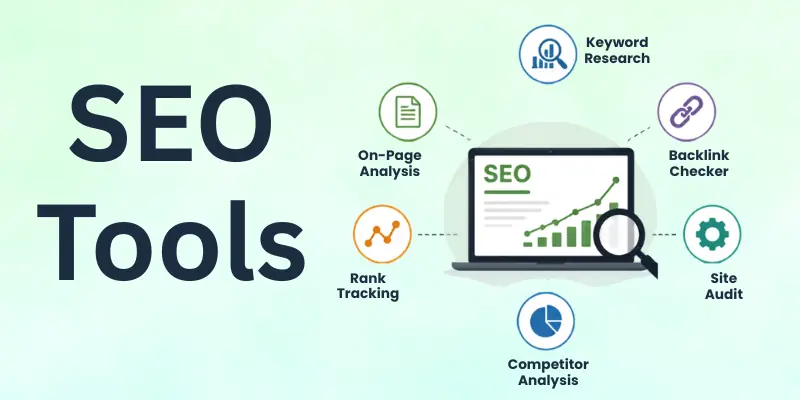
Before we get into the details, here’s a handy SEO tools list covering some of the most useful platforms across different categories:
- Google Search Console
- Google Keyword Planner
- Ubersuggest
- Yoast SEO
- GTmetrix
- Ahrefs
- SEMrush
- Moz Pro
- Screaming Frog
- SE Ranking
This list of SEO tools mixes free and paid options, so there’s something here no matter your budget or experience level. If you’re just getting started, you will be glad to know there are plenty of the best free SEO tools that won’t cost you a single rupee.
These are perfect free SEO tools for beginners who want to learn the ropes before investing in anything paid. Let’s break each one down so you know exactly what it does and when to use it.
1. Google Search Console
Google Search Console shows you exactly how your website performs in Google’s search results. It tells you which pages get clicks, which keywords bring in traffic, and whether Google has run into any crawling or indexing issues on your site. Since it comes straight from Google, the data you get is as accurate as it gets, making this one of the most trusted free seo tools online.
Beyond performance tracking, it also alerts you to mobile usability problems and security issues before they hurt your rankings. Setting it up takes just a few minutes, and once it’s connected, it keeps working quietly in the background.
- Tracks clicks, impressions, and average position
- Flags indexing and crawling errors
- Free to use for any website
- Alerts you to mobile usability issues
- Directly connected to Google’s search data
- No technical background required
2. Google Keyword Planner
Google Keyword Planner helps you find out what people are actually typing into search engines before you write a single word. You simply enter a topic, and it hands you a list of related keywords along with estimated search volume and competition level. This makes it one of the SEO tools for beginners who need a starting point for their content strategy.
Since it’s built into Google Ads, it pulls data straight from the source, which makes the numbers fairly reliable compared to many third-party guesses. It also groups keyword ideas by theme, so planning a content calendar becomes much easier.
- Free keyword suggestions with search volume
- Groups keywords by topic
- Data pulled directly from Google Ads
- Helps plan long-term content strategy
- Works for any niche or industry
- Simple, beginner-friendly interface
3. Ubersuggest
Ubersuggest gives you keyword ideas, content suggestions, and a basic site audit all from one dashboard. You can check search volume, competition, and even see what content is already ranking for a given keyword, which takes a lot of guesswork out of planning. It’s one of the simpler SEO tools out there for anyone who doesn’t want a steep learning curve.
The free version offers a generous number of daily searches, which is usually enough for small blogs and new websites. As one of the most reliable free SEO software tools on the market, it strikes a nice balance between features and ease of use.
- Keyword research with volume data
- Basic site audit features
- Content ranking insights
- Free daily search allowance
- Competitor keyword tracking
- Clean, easy-to-navigate dashboard
4. Yoast SEO
Yoast SEO works as a plugin for WordPress sites and guides you through optimizing each post as you write it. It checks your keyword usage, readability, and meta description, then gives simple color-coded feedback so you always know what needs fixing. For anyone searching for reliable free seo apps built for content creators, this is a solid starting point.
You don’t need any SEO background to use it well, since every suggestion comes with a plain-language explanation. Millions of WordPress sites run on it, and its free version alone covers most of what a new blogger needs.
- Real-time SEO scoring for each post
- Readability checks as you write
- Meta description and title suggestions
- Works directly inside WordPress
- Free and premium versions available
- Trusted by millions of website owners
5. GTmetrix
GTmetrix checks how fast your website loads and points out exactly what’s slowing it down. Since page speed directly affects both rankings and user experience, this tool plays a bigger role in SEO than many people realize. It’s considered one of the essential SEO tools for anyone serious about site performance.
The report breaks issues down into clear, actionable steps, so even non-technical users can understand what to fix first. Combined with the other free search engine optimization tools on this list, it rounds out a solid beginner toolkit without costing anything.
- Detailed page speed reports
- Highlights specific loading issues
- Free to use with no signup limits
- Beginner-friendly recommendations
- Works for any website platform
- Helps improve both SEO and user experience
Once your website starts growing, you might want to explore paid SEO tools that offer deeper insights and automation.
These platforms are often considered advanced SEO tools because they handle large-scale audits, competitor research, and rank tracking that free tools simply can’t match.
6. Ahrefs
Ahrefs is widely known for its backlink database, which is one of the largest in the industry. It lets you see exactly which websites link to you, which ones link to your competitors, and where new link opportunities might be hiding. Many professionals treat it as their go-to SEO toolkit for competitive research.
Beyond backlinks, it also covers keyword research, rank tracking, and full site audits in one dashboard. It’s considered among the best tools for SEO professionals who need detailed, reliable data to guide bigger decisions.
- Massive backlink database
- Keyword research and rank tracking
- Full technical site audits
- Competitor analysis features
- Content gap analysis
- Detailed, exportable reports
7. SEMrush
SEMrush combines keyword research, site auditing, and competitor tracking into one all-in-one platform. You can spy on a competitor’s top-performing keywords, track your own rankings daily, and get suggestions for improving your content, all from a single login. It’s often listed among the best software SEO picks for agencies and larger businesses.
Its toolkit also covers paid advertising research, social media tracking, and local SEO, which makes it useful well beyond basic optimization. As one of the most complete search engine optimization software options out there, it’s built for teams that need everything in one place.
- All-in-one SEO and marketing suite
- Competitor keyword and traffic analysis
- Daily rank tracking
- Content optimization suggestions
- Paid ad and social media insights
- Built for agencies and larger teams
8. Moz Pro
Moz Pro focuses on making SEO data easier to understand, even for people who are newer to the technical side. Its Domain Authority score has become a widely referenced metric across the industry, giving you a quick way to gauge how a website compares to others. It’s a dependable pick among online seo software built with clarity in mind.
The platform also includes keyword research, site audits, and rank tracking, wrapped in a clean, approachable interface. Many marketers appreciate it as one of the more professional SEO tools that still feels manageable day to day.
- Industry-recognized Domain Authority score
- Keyword research and difficulty scoring
- Site audit and rank tracking
- Clean, beginner-friendly interface
- Chrome extension for on-the-go checks
- Strong educational resources included
9. Screaming Frog
Screaming Frog crawls your entire website the way a search engine would, uncovering broken links, duplicate content, and missing meta tags in one scan. It’s especially useful for larger sites where manually checking every page simply isn’t realistic. As one of the more technical online tools for SEO, it’s built for people who want full control over their site’s structure.
The free version handles smaller websites well, while the paid version removes crawl limits entirely for bigger projects. Many technical SEOs count it among the search engine optimization tools they can’t work without.
- Crawls entire websites for issues
- Detects broken links and redirects
- Finds duplicate content and missing tags
- Free version for smaller sites
- Detailed exportable crawl reports
- Popular among technical SEO specialists
10. SE Ranking
SE Ranking offers rank tracking, keyword research, and site auditing at a price point that’s friendlier than many competitors. It’s a flexible option for freelancers and small agencies who want solid features without an enterprise-level budget. Some of the best SEO apps on mobile also come from platforms like this, letting you check rankings on the go.
Its white-label reporting feature is especially handy for agencies managing multiple client websites. Combined with its competitive pricing, it’s become a favourite among smaller teams that still want professional-grade results.
- Affordable rank tracking and keyword research
- Site audit with actionable fixes
- White-label client reporting
- Competitor monitoring tools
- Mobile app for on-the-go checks
- Budget-friendly for freelancers and small teams
Choosing between free and paid tools comes down to your budget and how deep you want to go with your optimization work.
Free vs Paid SEO Tools: Quick Comparison
Here’s a quick side-by-side look to help you decide.
| Feature | Free SEO Tools | Paid SEO Tools |
|---|---|---|
| Cost | Free forever or limited trial | Monthly or yearly subscription |
| Keyword data | Basic volume and suggestions | Detailed volume, trends, and difficulty scores |
| Site audits | Limited pages or basic checks | Full-site crawls with deeper insights |
| Backlink data | Very limited or unavailable | Extensive, regularly updated databases |
| Rank tracking | Manual or limited tracking | Automated daily tracking |
| Best for | Beginners and small websites | Growing sites, agencies, and teams |
| Support | Community forums or help docs | Dedicated customer support |
If you’re just starting out, free tools give you everything you need to learn the basics without any pressure.
Once your website grows and you need faster, more detailed insights, upgrading to a paid tool starts to make real sense.
AI SEO Tools
Artificial intelligence has started changing how people handle keyword research, content creation, and even technical audits. These ai seo tools tools do not replace good SEO judgment, but they speed up tasks that used to take hours, which makes them worth exploring once you’ve got the basics down.
- Surfer SEO: Scores your content against top-ranking pages as you write.
- Frase: Builds content briefs and answers research questions in seconds.
- ChatGPT: Helps brainstorm topics, outlines, and meta descriptions quickly.
- Jasper: Generates first drafts and keyword-focused content ideas.
- Content at Scale: Produces long-form, optimized articles at speed.
Pairing one of these with your regular toolkit can save you real time, especially on repetitive tasks like outlining or first drafts. Just remember that the final quality still depends on you, since no tool can fully replace a human editor’s eye for what actually helps readers.
Final Thoughts
By now, you should have a clear answer to what are seo tools and how each type fits into your website’s growth. You don’t need to use all ten platforms at once. Start with one or two free tools, get comfortable with the basics, and add paid options only once your site actually needs the extra depth.
Whether you stick with free tools or eventually invest in a paid suite, the goal stays the same: helping your website get found by the right people at the right time.
People Also Ask About SEO Tools
Still curious about SEO tools? Here are the questions people search for most often, answered in a few quick lines.
SEO tools help you research keywords, track your website’s rankings, and spot technical problems that could be hurting your visibility. They save you from doing all this manually, which would take far more time and effort.
Most tools also give you insights into what your competitors are doing well. This helps you make smarter, data-backed decisions instead of guessing.
Yes, free tools like Google Search Console and Ubersuggest cover most of what a beginner actually needs. They handle keyword research, basic audits, and performance tracking without any cost.
As your site grows and your needs get more complex, you can always upgrade to paid options. For most new websites, free tools are more than enough to start.
Google Search Console is usually the best starting point since it’s free, official, and easy to understand. Yoast SEO is another great pick if you’re using WordPress and want on-page guidance.
Both tools explain their suggestions in plain language, so you don’t need prior SEO knowledge. Together, they cover the basics well.
No, many websites rank well using only free tools, especially in the early stages. Paid tools become more useful once you’re managing multiple sites or competing in a crowded niche.
They offer deeper data, automation, and time-saving features. But paying for a tool doesn’t guarantee rankings on its own.
Most website owners get by using two or three tools that cover different needs, like keyword research, site audits, and rank tracking. Using too many tools at once can get overwhelming and often leads to duplicate work.
It’s better to master a few tools than to spread yourself thin across many. You can always add more as your site grows.
No tool can guarantee a specific ranking, since Google’s algorithm considers hundreds of factors. What these tools do is show you where you stand and what to improve. Consistent, quality content combined with smart tool usage tends to bring the best long-term results. Think of them as guides, not shortcuts.
Free tools usually offer limited data, fewer daily searches, and basic features that work fine for small sites. Paid tools unlock deeper data, higher usage limits, and advanced features like full-site audits or extensive backlink databases.
The right choice depends on your website’s size and how serious your growth goals are. Many people start free and upgrade later.
While most SEO tools focus on websites, some also offer App Store Optimization features for mobile apps. These help improve an app’s visibility within app store search results, which works similarly to traditional SEO.
If you manage both a website and an app, look for a platform that supports both. This saves you from juggling separate tools for each.




- Be Respectful
- Stay Relevant
- Stay Positive
- True Feedback
- Encourage Discussion
- Avoid Spamming
- No Fake News
- Don't Copy-Paste
- No Personal Attacks
- Be Respectful
- Stay Relevant
- Stay Positive
- True Feedback
- Encourage Discussion
- Avoid Spamming
- No Fake News
- Don't Copy-Paste
- No Personal Attacks
