How to Learn Data Entry at Home Without Any Degree
Published: 10 Nov 2026
Many people want an online job that needs no degree and no special background. Data entry often comes first on that list. But when they sit down to try, they hit a wall. They do not know which skills matter, which tools to use, or where to practice.
I see this often with new job seekers. The good news is that how to learn data entry is not a mystery. When you follow a clear path and practice a little each day, you can learn data entry faster than you expect.
So what is the exact path from zero skills to your first data entry task? Let us start with the big picture.
How to Get Started with Data Entry
Most beginners jump between random videos and feel lost.
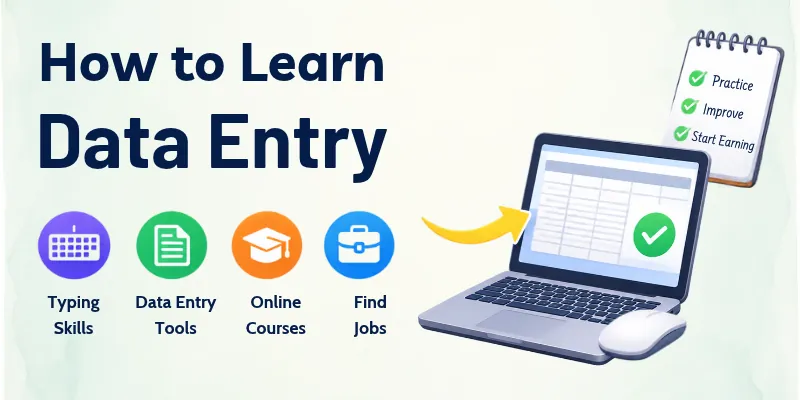
A simple plan saves you time and keeps you focused. These are the steps we will cover:
- Understand the Work
- Typing Skills
- Computer Basics
- Excel and Google Sheets
- Accuracy Practice
- Tools and Software
- Practice Projects
- Finding Real Work
Each step builds on the one before it, so follow them in order. Now let us walk through every step in detail.
How to Do Data Entry Step by Step
Follow these steps from your first day to your first job.
Step 1: Understand the Work
Data entry means moving information from one place to another. Before you begin data entry, know what the job looks like.
- Data can come from forms, invoices, emails, receipts, or scanned papers.
- You type this data into a spreadsheet, a database, or a company system.
- The main goals are speed, accuracy, and attention to detail.
Once you know the job, you can build the skills it needs. The first skill is typing.
Step 2: Typing Skills
Typing is the base of every data entry task. Slow typing makes the work tiring and keeps your income low.
- Use free typing tests and practice sites for 15 to 20 minutes every day.
- Learn to type without looking at the keyboard.
- Aim for about 40 words per minute first, then grow from there. Many entry-level jobs ask for a speed in this range.
Fast typing alone is not enough, though. You also need to feel comfortable with your computer.
Step 3: Computer Basics
You cannot work well on a system you do not understand. Basic computer skills help you stay calm on any task.
- Learn how to create, save, rename, and organize files and folders.
- Practice copy, paste, and keyboard shortcuts, because they save a lot of time.
- Get used to email, PDF files, and web browsers.
With these basics ready, you can move to the tool that most data entry jobs use every day.
Step 4: Excel and Google Sheets
Spreadsheets are the main workplace for data entry. If you can use them well, you stand out from other beginners.
- Learn rows, columns, cells, and how to format data neatly.
- Practice simple tools like sorting, filtering, and basic formulas such as SUM.
- Try both Microsoft Excel and Google Sheets, since companies use both.
A neat sheet is only useful when the data inside it is correct. That brings us to accuracy.
Step 5: Accuracy Practice
One small mistake, like a wrong digit in a phone number or price, can cause real problems for a business. Good data entry workers are careful first and fast second.
- Read each item once before you type it.
- Check your work after you finish each batch.
- Track your error rate and try to lower it every week.
When your accuracy improves, you can start using more tools with confidence.
Step 6: Tools and Software
Many companies now use software that reads documents and fills in fields automatically. People still check and fix the results, so tool skills are a big plus.
- Learn basic database ideas, like records, fields, and tables.
- Try free tools like Google Forms and Google Sheets to practice collecting data.
- Get to know simple customer management systems (CRMs) and how they store contact details.
Tools make more sense when you use them on real examples, so practice projects come next.
Step 7: Practice Projects
Practice turns knowledge into skill. You do not need a client to start.
- Copy data from a PDF or a printed page into a clean spreadsheet.
- Build a small contact list or expense tracker from scratch.
- Keep your best samples, because they can show your skills to future clients or employers.
After you build some samples, you are ready to look for paid work.
Step 8: Finding Real Work
Now you can apply your skills in the real world. Start small and stay careful.
- Look at job boards, freelance sites, and local company listings.
- Write a short profile that lists your typing speed, tools, and accuracy.
- Never pay money to get a data entry job. Real employers do not ask beginners for a fee.
You now have the full path in front of you. Before you go, a few habits can make your progress even smoother.
Data Entry Tips for Beginners
Small habits can make a big difference in your first months. Keep these tips close as you practice.
- Posture: Sit straight and keep your wrists relaxed, so you can type for longer without pain.
- Short Breaks: Rest your eyes for a minute every half hour to stay sharp.
- Shortcuts: Learn two or three new keyboard shortcuts every week.
- Double Check: Review your work before you submit it, every time.
- Clear Notes: Write down any rules a client gives you, such as date format or spelling style.
- Privacy: Treat customer information with care and never share it.
- Daily Practice: Even 30 minutes a day beats one long session each week.
- Progress Tracking: Write down your typing speed and error rate each week to see your growth.
These habits will keep you steady while you improve. Now you know the path and the habits, so let us see why all this effort is worth it.
Why Is It Important to Learn Data Entry?
Almost every business collects information, and someone has to keep it neat and correct. That is why data entry skills stay useful in many fields. Here are the main reasons this skill matters:
- Easy to enter: You do not need a degree or years of experience to start.
- Many job options: Banks, shops, hospitals, schools, and online companies all need people to handle data.
- Work from home: Many data entry jobs are remote and offer flexible hours.
- Quick start: With regular practice, you can build job-ready skills in a short time.
- Useful skills: Typing, computer use, and spreadsheet knowledge help you in almost any office job.
- Career growth: Data entry can lead to roles in admin work, bookkeeping, customer support, and data analysis.
With the value of this skill clear, let us bring everything together with one last piece of advice.
Conclusion
The key to how to learn data entry is steady practice with a clear plan. My personal advice is to pick one small goal each week, such as a higher typing speed or a lower error rate. Then check your progress every Sunday and write down what worked.
This simple habit keeps you motivated and shows you real growth. Over time, your speed will rise, your mistakes will fall, and your confidence will grow with every task you finish.
You now have a full plan, but you may still have a few doubts. Let us clear them up in the next section.
Data Entry FAQs: Answers to Common Questions
Still unsure about something before you start? You are not alone. These are the eight questions beginners ask most, with quick and clear answers.
1. What is data entry?
Data entry is the work of adding information to a computer system. This information can be names, numbers, addresses, or product details. It usually goes into spreadsheets or databases. The goal is to keep records neat and correct. Many businesses depend on this work every day.
2. Is data entry hard to learn?
No, the basics are easy for most people. You mainly need typing, basic computer use, and patience. You do not need a degree or a technical background. Most people feel comfortable after a few weeks of daily practice. Accuracy takes the most effort, so focus on it early.
3. What typing speed do I need for data entry?
The speed depends on the job. Keep these points in mind:
- Many entry-level roles ask for around 40 words per minute or more.
- Some companies set a target based on keystrokes per hour instead.
- Always check the job post for the exact number.
- Accuracy matters just as much as speed.
4. Which software should I learn first?
Start with the tools that most employers use. Follow this order:
- Learn Microsoft Excel or Google Sheets first, since they appear in most jobs.
- Add a basic word processor and PDF skills next.
- Try simple database tools or CRMs later.
Learn one tool well before you move to the next.
5. How can I do data entry from home?
Many data entry jobs are remote, so you can work from home. You need the following:
- A computer and a steady internet connection.
- A quiet place to work without distractions.
- A real company that you have checked before sharing personal details.
A good way to begin is to try a few small freelance tasks.
6. How long does it take to become job ready?
Most beginners need about four to eight weeks of regular practice. Your starting typing speed changes how fast you improve. Daily practice works better than long, rare sessions. Build a few sample projects during this time. They help you feel ready and show your skills.
7. Will AI replace data entry jobs?
AI tools now read documents and fill in some fields automatically. This means simple, repeated typing is changing. However, businesses still need people to check, fix, and organize data. Workers with spreadsheet skills and strong accuracy stay valuable. Keep learning new tools to stay ahead.
8. How can I avoid data entry scams?
A few simple checks can keep you safe. Follow these rules:
- Never pay a fee to start a job, because real employers do not charge beginners.
- Avoid offers that promise very high pay for very easy tasks.
- Search the company name and read reviews before you apply.
- Use trusted job sites and never share bank details early.




- Be Respectful
- Stay Relevant
- Stay Positive
- True Feedback
- Encourage Discussion
- Avoid Spamming
- No Fake News
- Don't Copy-Paste
- No Personal Attacks
- Be Respectful
- Stay Relevant
- Stay Positive
- True Feedback
- Encourage Discussion
- Avoid Spamming
- No Fake News
- Don't Copy-Paste
- No Personal Attacks
