Best Blogging Tools for Beginners: Free to Start Strong
Published: 30 Jul 2026
Blogging does not need to be complicated or expensive. There are plenty of free tools for blogging that are simple, beginner-friendly, and powerful enough to help you publish your first post today. You do not need a big budget, advanced technical knowledge, or years of experience to get started. All you need is one reliable tool, a bit of curiosity, and the willingness to learn as you go.
In this guide, we will walk through the best blogging tools that beginners actually use to write, design, optimize, and grow their blogs. Some of these tools help you build your website, while others help you write better, check your SEO, or connect with your readers. Pick one, learn its basics, and your blog will grow naturally with time. By the end of this article, you will have a clear list of options that fit your goals, your budget, and your comfort level.
Best Blogging Tools for Beginners
If you are new to blogging, you do not need to spend money right away. Many free tools for bloggers let you write, design, and manage a blog without any cost.
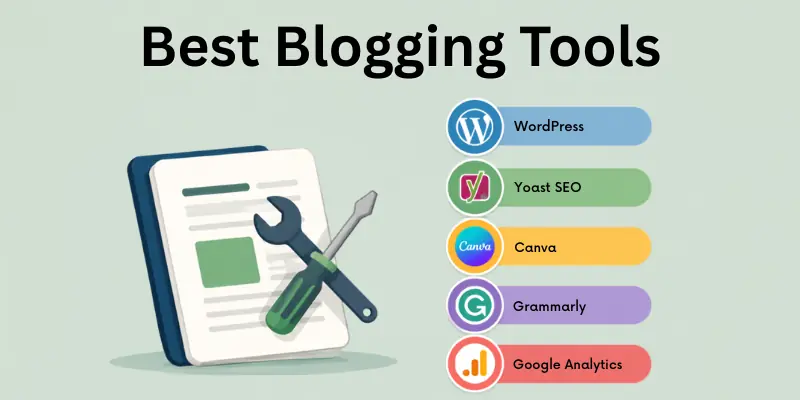
Below is a list of the best free blogging apps that are trusted by beginners and professionals alike, covering everything from writing platforms to SEO and email tools.
- Grammarly
- Yoast SEO
- RankMath
- Canva
- Google Analytics
- Mailchimp
- Ubersuggest
- Buffer
- Hemingway Editor
- CoSchedule
Let’s go through each one so you can see what makes it useful and where it fits into your blogging journey.
1. Grammarly
Grammarly checks your writing for grammar, spelling, and tone as you type and helps you avoid small mistakes that can make a blog post look unpolished. It works directly in your browser and connects with most blogging platforms, so you never have to copy your draft somewhere else just to proofread it. Beginners rely on it heavily because it builds writing confidence from the very first post.
Beyond fixing errors, it also flags unclear sentences and suggests simpler alternatives, which improves overall readability. The free version covers the basics well, while the premium plan adds deeper tone and clarity suggestions. Many bloggers keep it running in the background every time they write.
- Real-time grammar and spelling checks
- Tone and clarity suggestions
- Browser extension for most platforms
- Free and premium versions
- Works across blogs and emails
- Builds writing confidence over time
2. Yoast SEO
Yoast SEO guides you through optimizing each blog post for search engines, mainly as a WordPress plugin. It checks keyword usage, readability, and meta descriptions, then gives simple, color-coded suggestions so you know exactly what to fix. For beginners, this turns a confusing topic into a manageable checklist.
You don’t need any SEO background to use it effectively, since the tool explains its suggestions in plain language. Using it consistently, post after post, tends to improve how easily your content is found through search. It remains one of the most trusted names in blog SEO.
- Step-by-step SEO checklist
- Readability scoring
- Meta description support
- Keyword optimization guidance
- Free and premium versions
- Trusted by millions of WordPress users
3. RankMath
RankMath is a strong alternative to Yoast, offering a similarly simple setup with an even more generous free plan. It walks you through a setup wizard when you first install it, which makes configuring SEO settings far less intimidating for beginners. Many bloggers switch to it specifically because of how much it offers for free.
On top of basic optimization, it includes schema markup and site health checks, which are usually locked behind paid plans in other tools. This makes it a strong value pick for bloggers who want advanced SEO features without an extra cost. It works especially well alongside WordPress blogs.
- Generous free plan
- Simple setup wizard
- Schema markup support
- Site health monitoring
- Keyword rank tracking
- Strong alternative to Yoast SEO
4. Canva
Canva handles the visual side of blogging, from featured images to social media graphics promoting your posts. Even without design experience, you can create clean, professional visuals using ready-made templates in just a few minutes. Since blogs with strong visuals tend to hold reader attention longer, this tool plays a bigger role than many beginners expect.
Its drag-and-drop editor makes resizing and customizing designs simple, and you can reuse elements to keep your blog’s branding consistent. The free plan alone is enough for most beginners to design everything they need. It pairs well with any blog, regardless of platform.
- Drag-and-drop design editor
- Thousands of free templates
- Works on desktop and mobile
- Great for thumbnails and graphics
- Free and paid plans
- Helps maintain consistent branding
5. Google Analytics
Google Analytics shows you exactly how people find and interact with your blog, which removes a lot of guesswork from growing your content. As a beginner, understanding which posts perform well helps you decide what to write next, instead of guessing based on assumptions.
You can track visitor numbers, top posts, and traffic sources, all from one free dashboard. The amount of data can feel overwhelming at first, but focusing on just a few key metrics is enough when you’re starting out. Over time, checking it regularly becomes a normal part of running a blog.
- Tracks visitor behavior
- Highlights top-performing posts
- Completely free to use
- Works with most blogging platforms
- Guides future content decisions
- Detailed, exportable traffic reports
6. Mailchimp
Mailchimp helps you turn casual readers into a loyal audience by building an email list around your blog. Starting this early matters, since it gives you a direct way to bring readers back without relying only on search engines or social media. It handles the technical setup so you can focus on writing.
The platform offers ready-made newsletter templates and simple automation features, so you can send updates without much manual work. Its free plan is generous enough for most new bloggers, and you can upgrade only once your list grows. It connects easily with most blogging platforms.
- Free plan for beginners
- Ready-made newsletter templates
- Basic email automation
- Audience growth tracking
- Works with most blogging platforms
- Builds long-term reader loyalty
7. Ubersuggest
Ubersuggest helps you decide what to write about by showing real search data instead of guesswork. You can check search volume, competition, and related keyword ideas before you even start drafting a post, which makes your content planning far more strategic from day one.
It also includes basic site audit features, helping you spot simple SEO problems early. The free version offers enough daily searches for most beginners who are not ready to invest in paid keyword tools yet. Over time, it can shape your entire content strategy.
- Keyword research and search volume data
- Content idea suggestions
- Basic SEO site audits
- Free daily searches included
- Competitor analysis features
- Beginner-friendly, simple interface
8. Buffer
Buffer lets you schedule your blog posts across social media instead of manually sharing them every time. For beginners, this solves one of the biggest challenges in blogging, which is staying consistent with promotion after a post goes live.
The free plan covers the basics, letting you connect a few social accounts and plan posts ahead of time. Its clean, simple interface makes it easy to learn within your first few uses. Many bloggers pair it directly with their publishing routine to save time each week.
- Free plan for basic scheduling
- Connects multiple social accounts
- Simple, clean interface
- Saves time on manual sharing
- Helps maintain posting consistency
- Good for beginner-level promotion
9. Hemingway Editor
Hemingway Editor focuses purely on making your writing clearer and more direct. It highlights long, complicated sentences and unnecessary passive voice, helping beginners simplify their style without losing meaning. For blog posts, this kind of readability often matters more than fancy vocabulary.
You can use it for free directly in your browser, without creating an account or installing anything. It doesn’t check grammar as deeply as some other tools, but it excels specifically at improving flow and readability. Many bloggers use it right after drafting, before final proofreading.
- Free, browser-based tool
- Highlights overly complex sentences
- Improves overall readability
- No account required
- Simple, color-coded feedback
- Works well alongside grammar checkers
10. CoSchedule
CoSchedule helps bloggers plan and organize their content calendar in one central place. Staying consistent is often harder than the writing itself, and this tool makes planning ahead far more manageable, especially once you’re publishing more than one post a week.
It also offers a free headline analyzer that many bloggers use even without a full account, since strong headlines directly affect how many people click on a post. While some advanced features sit behind a paid plan, the free tools alone are genuinely useful for beginners learning to stay organized.
- Content calendar planning
- Free headline analyzer
- Helps maintain posting consistency
- Visual content organization
- Works with multiple platforms
- Useful for long-term planning
These tools each solve a different part of the blogging process, from writing and design to SEO and promotion. You don’t need to use all of them together right away. Pick the one or two that address your current biggest challenge, and let your toolkit grow naturally as your blog does.
Next, let’s look at some smart AI-powered options that can speed up your writing and SEO process.
AI Blogging Tools
Artificial intelligence has changed how people write, research, and optimize blog content. These tools do not replace good writing, but they can save significant time and give beginners a head start when they feel stuck. Many bloggers now use at least one AI tool alongside their regular blogging software as part of their daily workflow.
- Jasper AI: Generates blog drafts and content ideas.
- ChatGPT: Helps brainstorm topics and outlines.
- Copy.ai: Creates headlines and short content quickly.
- Surfer SEO: Optimizes content for search rankings.
- Frase: Researches topics and builds content briefs.
- Writesonic: Produces long-form blog content fast.
- INK Editor: Combines writing help with SEO scoring.
- Notion AI: Assists with outlining and organizing posts.
- SEO.ai: Suggests keywords and content structure.
- Content at Scale: Generates SEO-optimized long articles.
These smart tools can help you start fast, but genuine effort and consistency are still what keep readers coming back. The right mix of blogging apps and platforms can turn your blog from a hobby into a real source of income over time.
Conclusion
This guide about the best blogging tools for beginners shows that the right blog tools do not have to be complicated, even with so many options available today. Start with a simple platform, add one or two supporting tools for bloggers, and focus on writing content that genuinely helps your readers. As your blog grows, you can explore more advanced options at your own pace, without feeling pressured to use everything at once.
The best tools for bloggers are the ones that match your goals and comfort level, not necessarily the most popular ones on this list. Some beginners prefer simplicity, while others want full control over design and SEO from day one, and both approaches are perfectly valid. Take your time, experiment with different tools, and build habits that keep you consistent rather than overwhelmed.
FAQs
Before you pick your first blogging tool, here are quick answers to the questions beginners search for most often.
Blogging tools are apps or platforms that help you write, design, publish, and manage a blog. They cover everything from writing and editing to SEO and analytics. Beginners often start with just one tool and add more as needed. These tools save time and make blogging easier overall.
In simple terms, a blogging tool is anything that helps you run your blog more efficiently. This can include a writing platform, a design app, or an SEO checker. It removes technical stress so you can focus on content. Essentially, it supports every stage of the blogging process.
For beginners, blogging tools mean simple, often free resources that make starting a blog less overwhelming. They handle tasks like hosting, design, and grammar checking. This lets new bloggers focus on learning to write consistently. Over time, these tools become part of a regular workflow.
Yes, most blogging platforms offer free plans that are enough to get started. Tools like Blogger, Medium, Grammarly, and Canva all have free versions. These are usually sufficient until your blog starts growing. You can upgrade later once you need more features.
Mailchimp is one of the most popular tools for building and managing an email list. It offers free newsletter templates and basic automation features. Many bloggers use it to keep readers coming back after their first visit. The free plan is generous enough for most beginners to start with.
Buffer is a widely used free tool for scheduling blog posts across social media platforms. It helps bloggers stay consistent with promotion without manually posting every time. CoSchedule is another option that also helps plan a full content calendar. Both offer free plans suitable for beginners.
Yoast SEO and RankMath are among the most trusted tools for improving blog visibility. They guide you through keyword usage, readability, and meta descriptions. Surfer SEO is also useful for deeper content optimization. Using any of these consistently can improve your blog’s search performance.




- Be Respectful
- Stay Relevant
- Stay Positive
- True Feedback
- Encourage Discussion
- Avoid Spamming
- No Fake News
- Don't Copy-Paste
- No Personal Attacks
- Be Respectful
- Stay Relevant
- Stay Positive
- True Feedback
- Encourage Discussion
- Avoid Spamming
- No Fake News
- Don't Copy-Paste
- No Personal Attacks
