Best Graphic Designing Software: Create Fast, Beautiful Designs
Published: 8 Apr 2026
The demand for design tools is growing fast. Every day, more people start creating content for social media, freelancing, and online businesses. So they search for the best graphic designing software to get started.
But when you open Google, you see too many options. Should you use Canva or go for Adobe Illustrator? Which one is easier? Which one helps you earn money online? I faced the same confusion when I started. I tried different tools for thumbnails, posts, and simple designs. Some tools felt too hard. Others did not give good results.
With time, I learned one clear thing. Not every piece of software works for everyone. The top graphic designing software depends on your goal, your skill level, and the type of work you want to do, which we will see in this guide.
Popular Graphic Design Software for Beginners
People often look for tools that are easy to use and also give professional results. Some software for graphic designers works best, while others suit advanced users.
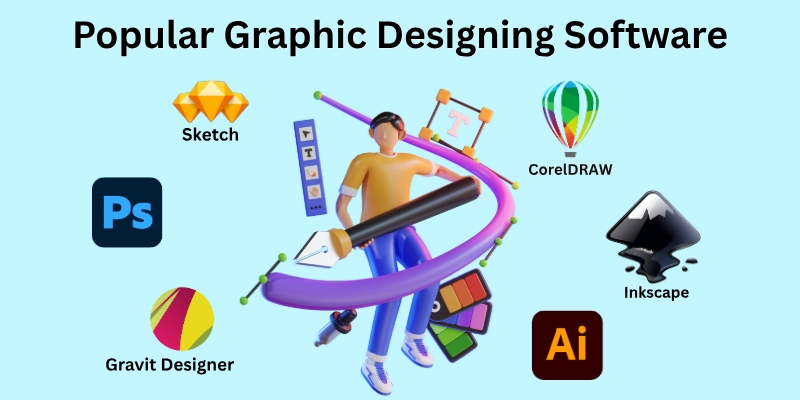
I have tested many of these tools in real projects, so you will see the list of graphic design software, which is simple and clear.
- Canva
- Adobe Photoshop
- Adobe Illustrator
- Adobe Express
- Figma
- Affinity Designer
- CorelDRAW
- Inkscape
- Krita
- Sketch
- Gravit Designer
- GIMP
- Pixlr
- Kittl
- VistaCreate
Let’s check out the best software for creating graphics that I personally find easy to use and powerful for all kinds of projects.
1. Canva
Canva is perfect for beginners who want to create designs quickly. It works directly in your browser, so you don’t need heavy software. I use it myself for social media posts and banners.
It does not require advanced design knowledge. Most people learn it quickly because the interface is clean and easy to understand.
- Offers thousands of ready-made templates.
- Drag-and-drop interface for fast designing.
- Free and paid plans to suit every budget.
- Works on desktop, tablet, and mobile.
- Great for social media graphics.
2. Adobe Photoshop
Photoshop is one of the most powerful photo editing tools. Most industries use it for photo editing and digital art. Professionals use it to create detailed graphics and retouch images.
It takes some practice, but it offers full creative control. Many professional designers learn Photoshop after they understand basic design tools.
- Advanced photo editing tools for detailed work.
- Layer system for complex designs.
- Supports plugins to extend functionality.
- High-quality export for print and web.
- Great for digital artwork.
3. Adobe Illustrator
Illustrator is the best choice for vector graphics like logos and icons. I use it for designing sharp, scalable images that don’t lose quality.
The designs stay clear even when the size becomes very large. This makes it useful for professional design projects.
- Vector-based design for sharp, scalable images.
- Advanced typography tools.
- Integrates with other Adobe apps.
- Great for logos, icons, and illustrations.
- Precision drawing features.
4. Adobe Express
Adobe Express is a simple design tool for creating social media posts, flyers, banners, and short videos. I like how quickly it helps turn ideas into clean and attractive designs without complicated steps.
Its layout tools are easy to understand for beginners. Users can create polished graphics in a short time. It is useful for beginners, students, and content creators who want fast results.
- Ready-made templates for quick designs.
- Easy background removal tools.
- Works well for social media content creation.
- Allows quick resizing for different platforms.
- Simple video editing features for short clips.
5. Figma
Figma is popular for UI and web design. Teams can work together online, making collaboration easy. It runs in the browser; users can access their work from different devices.
Teams can share ideas and edit designs in real time. I like it for creating website layouts and app screens and it is considered web design software.
- Real-time collaboration with team members.
- It works directly in the browser; no download needed.
- Vector editing tools for clean designs.
- Free version with most essential features.
- Useful for UI design.
6. Affinity Designer
Affinity Designer is a professional design tool. Many designers choose it as an alternative to Adobe Photoshop software.
It is fast, smooth, and affordable. I use it when I need professional-level results without subscription fees.
- One-time purchase with no subscription.
- Vector and raster tools in the same app.
- Smooth performance even on older devices.
- Ideal for illustrations, icons, and branding.
- Affordable alternative to Adobe Photoshop.
7. CorelDRAW
CorelDRAW is trusted for print design and commercial graphics. I use it quickly to make posters and business cards. It gives powerful tools for professionals.
The software provides strong control over shapes and layout. It is also popular in the printing industry.
- Vector-based design for detailed layouts.
- Page layout and typography tools.
- Large library of clipart and templates.
- Supports multiple file formats for printing.
- Used by many professionals.
8. Inkscape
Inkscape is a powerful, free, open-source vector tool. Beginners and budget-conscious designers love it because it costs nothing and still offers strong features.
I have used it to create simple logos and digital illustrations. It is supportive of SVG, PDF, and other formats.
- Completely free with no hidden costs.
- Vector tools for professional-quality images.
- Customizable interface to match your workflow.
- Supports SVG, PDF, and other formats.
- Comes with node editing tools for detailed vector adjustments.
9. Krita
Krita is perfect for digital painting and illustrations. Artists use it for comics, concept art, and creative projects. I enjoy its natural brush feel for painting digitally.
It also gives smooth control while working on detailed artwork. You can easily adjust tools to match your creative style.
- Brush engines mimic real painting tools.
- Layers and masks for complex artwork.
- Free and open-source software.
- Good for comics, sketches, and digital art.
- Supports high-resolution canvas for professional work.
10. Sketch
Sketch is popular with web and mobile app designers. I use it for UI mockups and prototypes. It keeps designs neat and professional.
It helps create clean layouts with better alignment. Designers can also work faster with reusable design elements.
- Vector-based design for sharp layouts.
- Plugins to extend functionality.
- Ideal for web and app interface design.
- Easy handoff to developers with export tools.
- Supports shared libraries for consistent designs.
11. Gravit Designer
Gravit Designer is a versatile tool for beginners and intermediate designers. I use it for quick, simple graphics and illustrations.
It works on almost any device. Designers use it for illustrations and layout work. It can work both online and offline.
- Cross-platform: Windows, Mac, Linux, and web.
- Vector tools for clean and precise designs.
- Free version with essential features.
- Export in multiple formats like PNG, JPG, and PDF.
- Works online and offline.
12. GIMP
GIMP is a free image editing program. It offers many features that are similar to Photoshop. Designers use it to edit photos and adjust images.
Since it is free, many beginners use it to practice editing skills. It also allows users to customize the workspace for easier editing.
- Similar to Photoshop.
- Supports layers and filters.
- Good for photo editing.
- Works on many operating systems.
- Useful for basic graphic design and image retouching.
13. Pixlr
Pixlr offers quick online photo editing. It works directly in the browser and does not require installation. Users can upload an image and start editing immediately.
This makes it useful for quick design work. The tool loads quickly and saves time during small projects.
- Browser-based editor.
- Fast image adjustments.
- Simple interface.
- Works without installation.
- Helpful for quick social media image editing.
14. Kittl
Kittl helps create modern typography designs. It provides stylish fonts and design elements that make text look attractive.
Many creators use it for posters and digital artwork. The platform focuses on simple tools for creative designs.
- Easy font editing tools.
- Perfect for posters.
- Ready design elements.
- Popular with content creators.
- Useful for creating vintage and text-based designs.
15. VistaCreate
VistaCreate is another beginner-friendly design tool. It offers ready templates for social media posts and marketing graphics.
Beginners can quickly create attractive visuals with simple editing options. It also supports basic animation features.
- Ready social media templates.
- Drag-and-drop editing.
- Animation features.
- Simple layout controls.
- Helpful for creating promotional graphics quickly.
These are software used for graphic design and give honest results, which makes them solid examples of professional graphic design software.
Comparison Table: Free vs Paid Software
Still not sure which tool to pick? Ok… This simple table shows which free online graphic designing software is paid, which is free, and what each one is best for. It will help you choose the right tool in seconds.
| Software Name | Type | Best For | Notes |
|---|---|---|---|
| Adobe Photoshop | Paid | Photo editing, professional graphics | Industry standard, advanced features |
| Adobe Illustrator | Paid | Logo and vector design | Perfect for scalable graphics |
| Adobe Express | Free / Paid | Fast content creation and social media posts | Simple tool with templates and basic editing features |
| Affinity Designer | Paid | Illustration and branding | One-time purchase, no subscription |
| CorelDRAW | Paid | Print and commercial design | Powerful vector tools |
| Sketch | Paid | UI/UX design | Mac-only, popular with app designers |
| Canva | Free / Paid | Social media posts, beginners | Free plan available, easy templates |
| Inkscape | Free | Vector graphics | Open-source, fully free |
| Krita | Free | Digital painting and art | Free and powerful for illustrators |
| Gravit Designer | Free / Paid | Simple vector design | Free plan available, cross-platform |
| Figma | Free / Paid | UI/UX and team design | The free plan works for most beginners |
| GIMP | Free | Photo editing and image retouching | Photoshop alternative, fully free and open-source |
| Pixlr | Free / Paid | Quick online photo editing | Works in browser, no installation needed |
| Kittl | Free / Paid | Typography and creative text designs | Great for modern posters and stylish fonts |
| VistaCreate | Free / Paid | Social media graphics and marketing designs | Beginner-friendly with ready-made templates |
Even the best software cannot help if you make simple mistakes. Avoiding these will save you time and frustration.
Common Mistakes to Avoid
Many beginners and even intermediate designers waste hours because of avoidable mistakes. I have seen these happen again and again in real projects.
- Choosing a tool without knowing your goal: Not every software fits every project. Pick what matches your needs.
- Starting with complex software as a beginner: Advanced tools can confuse and slow you down.
- Ignoring free tools: You can create great designs without paying at first.
- Relying only on templates: Templates are helpful, but overusing them can make your work look generic.
- Skipping practice: Learning a tool takes time; practice is essential.
- Ignoring device compatibility: Some software works only on certain devices; check before starting.
- Not organizing files properly: Messy files waste time and create stress later.
- Ignoring updates and new features: Updates can improve your workflow and add powerful tools.
- Copying designs instead of learning: Copying designs may look easy, but it does not help you improve.
- Overloading designs with too many elements: Simpler designs are often stronger and cleaner.
Now that the common mistakes are behind you, it’s time to focus on the tools that make designing easy and fun.
Conclusion
Throughout this post, we have seen that the best graphic designing software does not have to be confusing. The right tool depends on what you want to create and how comfortable you are with it. Don’t get stuck on one tool.
Use what works best for each project. Manage risks by practicing regularly, keeping your files organized, and continuing to learn the key features of the software you choose. Do you need a shortcut to smart designing? Our FAQs cover the answers most beginners and pros ask.
FAQs
Want to save time and learn smarter? The FAQs of this article will give you more details about the best graphic design software.
If you are new to design, you might wonder which software is best for graphic design for beginners. Tools like Canva and Gravit Designer are easy to use and don’t require prior experience. They provide templates and drag-and-drop features to help you create designs quickly.
Yes, there are several options for free downloading. Tools like Inkscape, Krita, and GIMP can be downloaded directly to your PC for free. They give beginners a chance to practice without paying anything.
Many beginners ask, “How does graphic design software work?” Basically, these tools let you create images using shapes, text, colours, and layers. You can combine elements, edit photos, and export your final design in different formats.
Some people wonder is Canva is graphic design software or just a template tool. Canva is a full design platform that works online with templates, images, and fonts. It is beginner-friendly and allows you to create professional-looking designs easily.
Professionals often prefer Adobe Photoshop and Illustrator for detailed editing and vector designs. These tools offer advanced features for both print and digital work.
Most tools like Photoshop, Canva (desktop version), and CorelDRAW run on Windows and macOS. Check system requirements to ensure smooth performance before installing.
Look for a laptop with a fast processor, at least 16GB RAM, and a good graphics card. This helps tools like Photoshop, Illustrator, or Figma run smoothly without crashing.
Yes, many people prefer free online graphic designing software because it’s convenient. Tools like Canva, Figma, and Gravit Designer let you design directly in your browser. They are perfect for beginners who do not want to install heavy programs.


- Be Respectful
- Stay Relevant
- Stay Positive
- True Feedback
- Encourage Discussion
- Avoid Spamming
- No Fake News
- Don't Copy-Paste
- No Personal Attacks
- Be Respectful
- Stay Relevant
- Stay Positive
- True Feedback
- Encourage Discussion
- Avoid Spamming
- No Fake News
- Don't Copy-Paste
- No Personal Attacks
