Best Content Writing Tools: Boost Your Content Writing Skills
Published: 19 Apr 2026
Writing content takes time, and sometimes you still feel stuck. I know this because I face it myself. You sit to write, but ideas do not come. Or you write something and then spend hours fixing mistakes. This is where the best content writing tools help. They make writing easier, faster, and less stressful, especially if you want to grow or earn online.
I started using these tools when I felt tired of wasting time on small mistakes. They helped me write with more confidence and finish work faster. If you face the same problem, you are in the right blog post. Now let me show you what these tools are and how they work.
What are Content Writing Tools?
Content writing tools are simple apps or software that help you create better-written content. They support you while writing blogs, articles, social media posts, and web pages. Some tools help you fix grammar, some suggest better words, and some even help you plan or write full content faster.
I use these tools when I want to save time and improve quality. Some tools help you create ideas, while others help you improve or polish your content. This simple idea makes your next choice much clearer.
Types of Content Writing Software
Content writing tools are not all the same. Each software has a different job and helps you at a different stage of writing. When I use these tools, I pick them based on what I need at that moment. If you understand the top content writing tools list, you can easily choose the right tool for your task.
- AI Writing Tools
Help you write blogs, articles, and posts quickly by giving text suggestions and ideas. - Grammar Checking Tools
Find spelling and grammar mistakes and help you fix them easily. - SEO Writing Tools
Help your content rank better on search engines by suggesting keywords and structure improvements. - Paraphrasing Tools
Rewrite sentences in a new way while keeping the same meaning. - Idea Generation Tools
Help you find topics, headlines, and new content ideas when you feel stuck. - Readability Tools
Make your content simple and easy to read for all types of users. - Plagiarism Check Tools
Check if your content is original and not copied from other sources.
Keep this in mind; it will help you pick tools without confusion. Let’s move on next.
Best Tools for Content Writing
Some tools write content, some fix errors, and some help with SEO and structure. I use a mix of tools because each one solves a different problem in writing.
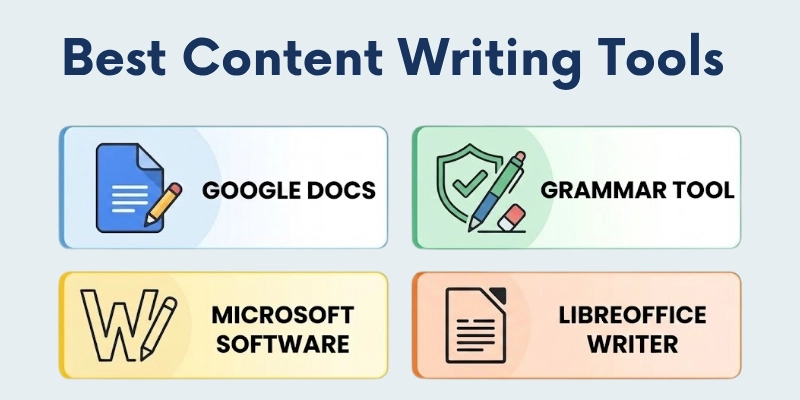
If you want better results, you should not rely on a single type of tool. Below is the list of the most popular and widely used content writing tools for freshers.
- Microsoft Word
- Google Docs
- Grammarly
- Notion
- Evernote
- Hemingway Editor
- ProWritingAid
- Scrivener
- LibreOffice Writer
- Zoho Writer
Now let’s look at the most commonly used tools.
1. Microsoft Word
People use this for clean, professional documents that need proper formatting.
- Works offline without internet
- Supports professional document formatting
- Helps create reports, blogs, and assignments
- Gives strong font and style control
- Easy to print or export files
- Used widely in offices and schools
2. Google Docs
This works best when writing and sharing happen at the same time online.
- Works directly in a web browser
- Auto-saves your writing instantly
- Allows real-time collaboration with others
- Easy sharing through links
- Accessible from any device
- Simple interface for daily writing
3. Grammarly
Writers rely on this to remove grammar and spelling issues before publishing.
- Detects grammar and spelling mistakes
- Suggests better sentence structure
- Improves tone for different audiences
- Helps reduce writing errors quickly
- Works inside the browser and apps
- Useful for final content proofreading
4. Notion
Content planners keep this for organizing ideas, tasks, and full workflows.
- Organizes notes and content ideas
- Creates simple content planning boards
- Stores text, images, and links together
- Helps manage projects in one place
- Supports teamwork and sharing
- Keeps writing workflow structured
5. Evernote
Many writers save random ideas here so they don’t forget them later.
- Saves quick notes anytime
- Stores text, images, and voice notes
- Helps collect ideas on the go
- Syncs across multiple devices
- Keeps research material organized
- Works well for daily idea tracking
6. Hemingway Editor
This helps when sentences feel long and need a simpler, clearer form.
- Highlights long and complex sentences
- Improves readability of content
- Shows hard-to-read phrases clearly
- Encourages a simple writing style
- Gives readability score
- Helps make content more direct
7. ProWritingAid
This is used when writing needs deeper checking beyond basic grammar fixes.
- Checks deep grammar and style issues
- Improves sentence flow and structure
- Suggests better word choices
- Gives detailed writing reports
- Works well for long articles
- Helps refine writing quality
8. Scrivener
Authors use this for handling large writing projects in a structured way.
- Breaks big projects into sections
- Helps manage book-length content
- Stores research and drafts together
- Supports flexible writing structure
- Useful for storytelling projects
- Keeps long writing organized
9. LibreOffice Writer
This works well for offline writing without needing paid software.
- Free alternative to paid writing tools
- Works without an internet connection
- Supports basic document formatting
- Good for simple writing tasks
- Compatible with multiple file types
- Lightweight and easy to install
10. Zoho Writer
Teams use this for smooth online document sharing and editing.
- Cloud-based writing platform
- Allows team collaboration in real time
- Tracks document changes easily
- Works smoothly on multiple devices
- Supports clean document editing
- Useful for shared writing projects
These tools are a solid starting point; you can see how each tool supports a different part of writing, from ideas to final editing. Stuck on ideas or words? These tools can help you move forward.
AI Tools for Content Writing
Writing content takes time, effort, and clear ideas. AI content writing tools make this process easier. AI writing tools help you plan and write faster. You can use them to get topic ideas, improve your sentences, or create full drafts.
- Jasper AI: Helps you write blogs, ads, and marketing content quickly.
- Copy.ai: Great for short content like captions and product descriptions.
- Writesonic: Creates articles, landing pages, and ad copy in seconds.
- Rytr: A simple tool for writing emails, blogs, and social posts.
- QuillBot: Rewrites and improves your sentences easily.
- Grammarly: Checks grammar, spelling, and tone.
- Surfer SEO: Helps you write content that ranks on search engines.
- Frase: Combines research and writing in one place.
- Scalenut: Helps with keyword research and long-form content.
- INK Editor: Focuses on SEO-friendly content writing.
If you use these tools smartly, you can create better content in less time. The next step is to understand what works well in these tools and what limits they have.
Pros and Cons of Content Writing Tools
Every writing tool has its own strengths and limitations. When you know both sides, you can use them in a smarter way and avoid common mistakes.
Advantages
- Helps save time by making writing faster.
- Improves grammar and reduces small mistakes.
- Gives support when ideas are not coming.
- Makes content clearer and easier to read.
- Helps maintain a consistent writing style.
Disadvantages
- May reduce original thinking if overused.
- Some tools give suggestions that are not always correct.
- Paid versions can be expensive for beginners.
- Needs internet for many online content writing tools.
- Can make writing feel less personal if fully depended on.
Both merits and demerits of content writing tools and ai writing tools help you use them in a balanced way without depending on them too much. Let’s make the final part easy to understand.
Final Thoughts
This article shows how to use the best content writing tools, which make writing work easier for beginners and professionals. They help with speed, structure, and overall quality, which saves time in daily tasks.
I personally suggest using them in a controlled way. I take help from these tools, but I always review and adjust the content myself. This keeps the writing accurate and also protects my own style. It also reduces the chance of depending on tools too much. Let’s check a few quick FAQs next.
FAQs
Here are the quick FAQs to clear your last doubts about the best content writing tools.
The best content writing tools help beginners write, edit, and improve content easily. Tools like Google Docs, Grammarly, and Hemingway Editor are simple to use. They help you avoid mistakes and write clearer content.
Yes, many free content writing software options are available for new writers. Google Docs and LibreOffice Writer are good examples. They help you write and save content without any cost.
Some writers prefer open-source content writing tools for more control and flexibility. LibreOffice Writer is a popular example in this category. These tools are free and can be used without restrictions.
Professional writers often use tools like Microsoft Word, Grammarly, and ProWritingAid. These tools help improve grammar, structure, and readability. They also support long-form content work.
Yes, some tools help improve SEO by improving structure and readability. Clear and well-structured content ranks better on search engines. Tools like Grammarly and Hemingway Editor support this process.
You should choose tools based on your writing goal and experience level. Beginners can start with simple tools like Google Docs and Grammarly. Advanced users can use tools for deeper editing and long-term content work.





- Be Respectful
- Stay Relevant
- Stay Positive
- True Feedback
- Encourage Discussion
- Avoid Spamming
- No Fake News
- Don't Copy-Paste
- No Personal Attacks
- Be Respectful
- Stay Relevant
- Stay Positive
- True Feedback
- Encourage Discussion
- Avoid Spamming
- No Fake News
- Don't Copy-Paste
- No Personal Attacks
