Types of Digital Skills – Complete Detail for Online Success
Published: 18 Feb 2026
Many people dream of making money online, but most quit because they pick the wrong skills or learn in the wrong way. This mistake happens often. The real solution is simple: know the types of digital skills first.
When you understand the categories, you can match them with your goals and avoid wasted time, frustration, and random training that brings no results. You also get clarity on which skills pay fast, which skills need time, and which skills help with career growth.
That is when, if you are guided properly and choose good skills for yourself, progress finally becomes visible. Let’s get into detail about our good-paying future.
Kinds of Digital Skills
When we talk about the core categories of digital skills, we look at how people use technology to communicate, create, solve problems, and earn.
Today, schools, businesses, and freelancers all rely on digital knowledge for basic tasks and advanced work. Are you ready to know which are the main categories of digital skills?
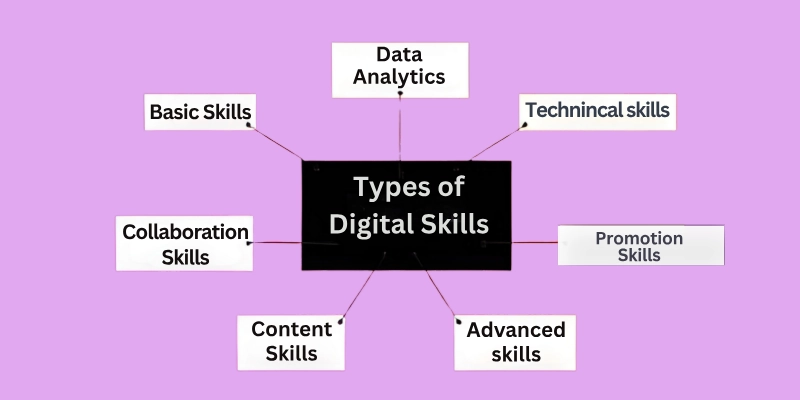
- Basic Digital Literacy
- Collaboration Skills
- Content Skills
- Online Promotion Skills
- Technical & Development Skills
- Data & Analytical Skills
- Advanced Skills
These skills keep growing fast as more companies move to online systems and remote setups. Check the full information.
1. Basic Digital Literacy
This level covers everyday tasks like using browsers, email, spreadsheets, cloud storage, and file management. Many beginners ask what are basic digital skills, and the answer is simple: skills that help you use computers and the internet confidently.
These skills also include safety habits, such as setting strong passwords and avoiding scams. Governments and learning platforms offer free lessons to teach these basic skills in technology to students and workers because the demand keeps rising.
Important basic digital skills:
- Computer & Internet Use
- Cloud Handling
- Email Handling
- Online Safety
Let’s look in detail:
Computer & Internet Use:
Open apps, manage folders, search information, download files, and handle settings independently. This skill also teaches beginners how online tools work together.
- Open apps, navigate folders, and manage system settings efficiently.
- Search for accurate information online and download files safely.
- Install, update, and organize programs or applications confidently.
- Troubleshoot basic computer issues independently.
- Use online tools like calendars, reminders, and note apps for daily tasks.
Cloud Handling:
Save files on Google Drive or Dropbox, share folders with others, and access work from a phone or laptop. This helps students and workers stay organized and avoid losing data.
- Upload and organize files on Google Drive or Dropbox.
- Share documents with proper permissions and manage folder access.
- Access files from any device for flexible work or study.
- Collaborate with others on shared documents in real time.
- Maintain cloud storage quality by deleting unnecessary files and backing up data.
Email Handling:
Write clear subject lines, send attachments, create folders, and manage calendars. Email remains a key channel for jobs, business, and support.
- Compose clear, professional emails with proper subject lines.
- Organize your inbox using folders, labels, and filters for efficiency.
- Attach files, images, and links safely and appropriately.
- Schedule emails and set reminders for follow-ups.
- Communicate clearly with clients, teams, or teachers via email.
Online Safety:
Protect accounts with strong passwords, avoid phishing scams, check secure websites, and keep personal data private. These habits reduce online risks for beginners.
- Create strong passwords and enable two-factor authentication.
- Identify phishing attempts, spam, and suspicious websites.
- Protect personal and financial information while online.
- Keep antivirus and security software updated regularly.
- Practice safe browsing habits to prevent malware or hacks.
2. Collaboration Skills
These skills help you talk, share, and work online with teams or clients. Video meetings, shared documents, and digital project tools are now common in offices.
With the rise of digital skills in remote work, companies expect workers to handle communication tools with confidence. These tools help freelancers connect with global clients without needing a physical office.
Critical digital skills include:
- Video Meetings
- Team Messaging
- Shared Productivity
- Digital Etiquette
Let’s take a quick overview.
Video Meetings:
Plan and run calls on Zoom or Meet, share screens, take notes, and mute/unmute without confusion. Many companies now hire globally using remote interviews.
- Schedule, host, and join Zoom, Google Meet, or Teams calls confidently.
- Share screens, present slides, and collaborate during meetings.
- Take notes and manage participant controls professionally.
- Record meetings for future reference or team sharing.
- Solve technical issues like audio/video problems efficiently.
Team Messaging:
Use Slack or Teams to communicate quickly with groups, share links, and store conversations by topic. This reduces email overload and speeds up tasks.
- Send updates, files, and reminders using Slack, Teams, or Discord.
- Organize conversations with threads or channels by topic.
- Respond promptly to maintain workflow.
- Use emojis or reactions appropriately to convey tone clearly.
- Integrate apps (calendars, task lists) into messaging tools for efficiency.
Shared Productivity:
Co-edit Docs, Sheets, and Slides in real time, assign tasks, and track progress inside the same workspace. This is now standard in remote teams.
- Co-edit documents, spreadsheets, and presentations with teammates.
- Assign tasks, track progress, and monitor deadlines.
- Maintain version control to avoid errors.
- Provide feedback directly within shared files.
- Access and edit files from anywhere without losing changes.
Digital Etiquette:
Use polite language, reply on time, avoid confusing messages, and keep a professional tone when talking to clients or teammates.
- Use professional language in emails, chats, and calls.
- Avoid sending unclear or incomplete messages.
- Respond within reasonable timeframes.
- Respect team members’ online time and availability.
- Follow company or team policies for virtual communication.
3. Content Skills
Digital content runs the internet. Young creators use these skills on social platforms, and businesses use them for branding and marketing.
Many people choose digital skills to learn online because they are affordable to start and easy to practice from home.
The most valuable digital skills:
- Graphic Design
- Video Editing
- Writing for the Web
- Social Media Content
Now see its fast overview.
Graphic Design:
Design posters, ads, thumbnails, and brand kits using Canva, Photoshop, or Illustrator. These skills help businesses show their identity clearly.
- Design logos, posters, and social media visuals using Canva, Photoshop, or Illustrator.
- Adjust colours, fonts, and layouts to match branding.
- Export files in multiple formats for web or print.
- Create templates for recurring content to save time.
- Enhance visuals to make them engaging and shareable.
Video Editing:
Cut clips, adjust voice levels, add effects, insert captions, export in HD, and match formats for YouTube, Reels, or TikTok. Short-form video demand keeps rising.
- Trim clips, add captions, and adjust audio.
- Add effects, transitions, and animations for engagement.
- Optimize video quality for platforms like YouTube, Reels, or TikTok.
- Mix visuals with music or voiceovers to enhance storytelling.
- Convert raw footage into polished, shareable content.
Writing for the Web:
Write blogs, product pages, email copy, and social captions with clarity and purpose. Web writing focuses on fast impact and scannable structure.
- Write blog posts, product descriptions, and email content clearly.
- Structure content with headings, bullets, and short paragraphs.
- Use keywords naturally to improve readability and search performance.
- Tailor content to the audience’s needs and interests.
- Edit and proofread for clarity and grammar.
Social Media Content:
Plan weekly content, use hooks, manage trends, and format posts for engagement. Brands depend on creators to grow visibility and trust.
- Plan weekly posts and campaigns for engagement.
- Use hooks, hashtags, and trends strategically.
- Format content for images, captions, and videos.
- Monitor engagement and respond to comments or messages.
- Adjust strategies based on platform analytics.
4. Online Promotion Skills
These skills help businesses grow leads, convert sales, and build trust online. Social media marketing, SEO, paid ads, email campaigns, and content strategy sit under this group.
These skills create strong demand for digital skills jobs, especially in e-commerce and service markets. Many companies now hire marketers who understand customer behaviour, analytics, and platforms like Meta, Google, and TikTok.
Fundamental digital skills:
- Social Media Marketing
- SEO & Content Strategy
- Email & Automation
- Paid Ads
Now review the brief note on it:
Social Media Marketing:
Manage brand pages, plan campaigns, track insights, and talk to followers. This skill helps small businesses and personal brands grow online.
- Manage brand pages, post content, and interact with followers.
- Plan campaigns aligned with business goals.
- Track engagement metrics and adjust strategies.
- Use creative content to grow brand visibility.
- Collaborate with influencers or partners for promotions.
SEO & Content Strategy:
Research keywords, write structured articles, optimize meta tags, and improve rankings. This brings traffic without paying for ads.
- Research and apply relevant keywords.
- Write meta tags, titles, and structured content for search engines.
- Optimize website pages to improve rankings.
- Monitor organic traffic and adjust strategies.
- Create content that matches audience intent and improves conversion.
Email & Automation:
Design newsletters, set triggers for onboarding, and send follow-up messages. Automation saves time and increases sales for small companies.
- Design email campaigns and newsletters.
- Set triggers for onboarding, follow-ups, or reminders.
- Personalize emails for higher engagement.
- Schedule emails to reach the right audience at the right time.
- Monitor open rates and clicks to optimize performance.
Paid Ads:
Create and test ad sets, set daily budgets, monitor conversions, and adjust targeting. Paid ads remain a fast way to drive traffic and leads.
- Create ads on Google, Meta, TikTok, or LinkedIn.
- Set budgets, choose audiences, and test ad variations.
- Track conversion rates and ROI to improve campaigns.
- Adjust copy and visuals for better performance.
- Analyze results and optimize campaigns regularly.
5. Technical & Development Skills
This category includes web development, app development, databases, UI/UX, and system automation. This includes both basic and advanced technology skills.
The market for development talent keeps expanding because of new startups, fintech, and cloud services. Developers also use advanced digital tools to build faster and manage projects with less effort.
Key digital skills are:
- Web Development
- App Development
- UI/UX Design
- Automation Skills
Take a detail in a short insight.
Web Development:
Build sites with HTML, CSS, JavaScript, or WordPress. Developers handle both layout and functionality for business websites.
- Build websites using HTML, CSS, JavaScript, or CMS.
- Ensure responsive designs for desktop and mobile users.
- Debug and troubleshoot website issues.
- Optimize page speed and user experience.
- Maintain website security and performance updates.
App Development:
Create mobile apps, test features, fix bugs, and publish updates. Many startups prefer hybrid apps to reduce cost and speed development.
- Design mobile apps for Android and iOS.
- Test features, fix bugs, and improve functionality.
- Publish and manage app updates on stores.
- Integrate APIs and third-party tools for better functionality.
- Monitor app performance and user feedback.
UI/UX Design:
Design clean screens, map user journeys, test usability, and improve user satisfaction. This skill focuses on how people interact with a product.
- Create graphical interfaces for apps and websites.
- Map user journeys and test usability.
- Optimize layout, navigation, and user interactivity.
- Collect feedback and iterate on designs.
- Ensure consistency with brand style and guidelines.
Automation Skills:
Use scripts or tools like Zapier, Make, or Sheets automation to reduce repetitive tasks. Automation improves efficiency for small teams.
- Use Zapier, Make, or scripts to automate repetitive tasks.
- Connect apps and platforms to work seamlessly together.
- Reduce manual work and save time for teams.
- Monitor workflows and adjust automation as needed.
- Streamline business processes for efficiency.
6. Data & Analytical Skills
Data skills help people read numbers, understand patterns, and make decisions. These skills appear in marketing, business planning, education, and healthcare.
Companies rely on data dashboards and spreadsheet tools for everyday tasks. Even small shops use data to track sales and products. Remote teams need these skills to make decisions without meetings and paperwork.
Must-have digital skills include:
- Data Cleaning
- Spreadsheet Analytics
- Dashboards & Visualization
- Market Research
Let’s know these skills:
Data Cleaning:
Remove duplicates, fix formats, fill gaps, and convert raw data into usable sheets. Clean data improves decision-making.
- Remove duplicates, fix errors, and format raw data.
- Prepare standard data for consistent analysis.
- Fill gaps and correct inconsistencies.
- Convert data into usable formats.
- Ensure accuracy for reliable decisions.
Spreadsheet Analytics:
Use filters, formulas, pivots, and charts to study performance. These skills appear in sales, finance, marketing, and admin roles.
- Use formulas, charts, and pivot tables.
- Track KPIs, budgets, and sales trends.
- Summarize complex data clearly for easy understanding.
- Highlight patterns and anomalies for quick action.
- Share insights with teams using reports.
Dashboards & Visualization:
Build clear dashboards for clients or managers using Data Studio, Sheets, or Tableau. Visuals help teams take action faster.
- Build dashboards in Google Data Studio, Tableau, or Sheets.
- Visualize metrics for faster decision-making.
- Combine charts, graphs, and tables effectively.
- Customize views for managers, teams, or clients.
- Monitor real-time performance and trends.
Market Research:
Study consumer trends, competitor content, and industry movement. This helps brands plan smarter marketing and product strategies.
- Study competitors, consumers, and industry trends.
- Collect data through surveys, analytics, and reports.
- Identify opportunities and gaps in the market.
- Provide insights for marketing and product strategy.
- Track trends to improve campaigns and offerings.
7. Advanced Skills
These skills help people stay ahead in the fast-changing digital world and work on the latest technology trends. Learning these skills prepares you for high-demand roles, digital skills jobs that work from home, and projects that require specialized knowledge. Digital skills in India and in Pakistan are now growing at a top level.
Top advanced skills include:
- Artificial Intelligence (AI)
- Cloud Computing
- Cybersecurity
- Blockchain & Emerging Tech
Now note the bite-sized detail.
Artificial Intelligence (AI):
Learn to use AI-powered tools for writing, design, video creation, or automation. These skills help speed up work and improve productivity in almost any field.
- Use AI tools for writing, design, or automation.
- Train AI models or use pre-built solutions.
- Improve workflow efficiency and productivity.
- Analyze AI outputs and refine results.
- Explore AI applications for problem-solving or content creation.
Cloud Computing:
Work with platforms like AWS, Google Cloud, or Microsoft Azure to store data, run apps, and manage online services. Cloud skills are in high demand for remote teams and tech projects.
- Deploy, manage, and monitor apps on AWS, Azure, or Google Cloud.
- Store, access, and share data securely online.
- Scale applications and services for growing teams.
- Collaborate globally using cloud platforms.
- Ensure backups and multiple copies for safety.
Cybersecurity:
Protect systems, networks, and data from attacks. This skill is critical for businesses, freelancers handling sensitive info, and anyone working online.
- Monitor networks, devices, and systems for threats.
- Protect sensitive data and online accounts.
- Implement security protocols and patches.
- Respond to security breaches quickly.
- Educate users on safe online practices.
Blockchain & Emerging Tech:
Understand blockchain, NFTs, crypto, and IoT basics. These skills prepare you for the newest opportunities in tech and online business.
- Understand blockchain, NFTs, IoT, and crypto.
- Apply emerging tech in real-world projects.
- Analyze trends and explore innovation opportunities.
- Track developments to remain competitive.
- Use new tech to create secure, efficient solutions.
Now that you know the main types, if these skills matter today, their future impact might surprise you. We will uncover that in the next part.
Future of Digital Skills
The future of digital skills looks fast, flexible, and full of opportunities. New tools and platforms keep changing how people work, learn, and earn online. More companies hire talent from anywhere, and young learners build skills that match a global market.
Digital tools support business growth, remote teams, and online careers, while new roles appear in tech, content, and data. Anyone who learns these skills early gets a head start. Because the digital economy rewards people who adapt and stay updated. Before we close, here is a piece of advice for you to remember in the end.
Conclusion
Throughout this guide, we looked at the main types of digital skills and how they support studies, jobs, and online opportunities. These skills matter today because they give folks the power to shape their future instead of waiting for it.
I suggest focusing on skills that make sense for your dreams, not for trends, so you get real progress over time. Keep learning, buddies, and stay tuned for more. Before you finish, make sure to check the FAQ section because unanswered questions keep our minds stuck, and we lose clarity.
FAQs
Not sure about something? Find it out in the FAQ section.
Digital skills include all abilities to work with computers, the internet, and online tools. They range from basic skills like email and spreadsheets to advanced skills like coding, data analysis, and digital marketing. Knowing the different types helps beginners choose the right skills to learn for jobs or freelancing.
Digital skills help beginners handle online tasks confidently and open doors to remote work and online earning. Even basic skills improve productivity and communication in personal and professional life. Learning them early gives a strong foundation for advanced digital tools.
High-demand skills include data analytics, social media management, graphic design, coding, and cloud computing. These skills are often required in remote work or online jobs. Employers prefer candidates who can use digital tools efficiently and adapt to new platforms.
Yes, many digital skills allow you to work remotely. Skills like virtual assistance, social media management, and online marketing are commonly used for work-from-home opportunities.
Everyone should know how to use email, browse the internet safely, manage files, and work with documents and spreadsheets. These are considered basic digital skills for beginners and are required in almost all online jobs. Once mastered, you can build advanced skills more easily.
The time depends on the type of skill and your learning pace. Basic skills can take a few weeks, while advanced skills like coding or data analytics may take months of consistent practice. Setting clear goals helps you learn efficiently and track progress.
Absolutely. Learning in-demand digital skills for online jobs or freelancing can help you earn extra income or secure higher-paying roles. The more advanced and specialized your skills, the better the earning opportunities become.
No, digital skills are useful for all ages and experience levels. Even experienced professionals can benefit from learning new digital tools and online platforms. Staying updated keeps you competitive in today’s fast-growing digital world.
Follow the simple way:
- Start with short, focused sessions and gradually increase your learning time.
- Prioritize the skills that matter most for your goals and apply them in real tasks.
- This way, you avoid burnout while steadily improving your digital expertise.


- Be Respectful
- Stay Relevant
- Stay Positive
- True Feedback
- Encourage Discussion
- Avoid Spamming
- No Fake News
- Don't Copy-Paste
- No Personal Attacks
- Be Respectful
- Stay Relevant
- Stay Positive
- True Feedback
- Encourage Discussion
- Avoid Spamming
- No Fake News
- Don't Copy-Paste
- No Personal Attacks
