Graphic Design vs Web Design: Tools, Skills & Career Options
Published: 25 Feb 2026
This year, many people are debating graphic design vs web design and exploring creative skills for online work and freelancing. Both fields look similar at first glance because they involve visuals, creativity, and digital tools.
However, they serve different purposes and require different skills. Graphic designing focuses on creating visual content like logos, posters, and social media graphics. Web designing focuses on how a website looks, feels, and works for users.
People compare these fields to decide which skill to learn, which is easier, and which offers better earning opportunities. This article will explain the key differences, required skills, tools, and career choices in both fields so you can make the right choice. Let’s see which one suits you better.
Overview of Both
Graphic designing is the creation of visual content to communicate ideas and messages. It includes logos, posters, social media graphics, and branding materials. It suits people who enjoy creativity, visual storytelling, and non-technical design work.
What is web designing?
Web designing is the process of planning and creating the layout and appearance of websites. It focuses on user experience, navigation, and making sites look good on different devices. It suits those interested in digital layouts, usability, and working with website interfaces.
Now that you understand what each one does, let’s look at how they differ and which path might fit you better.
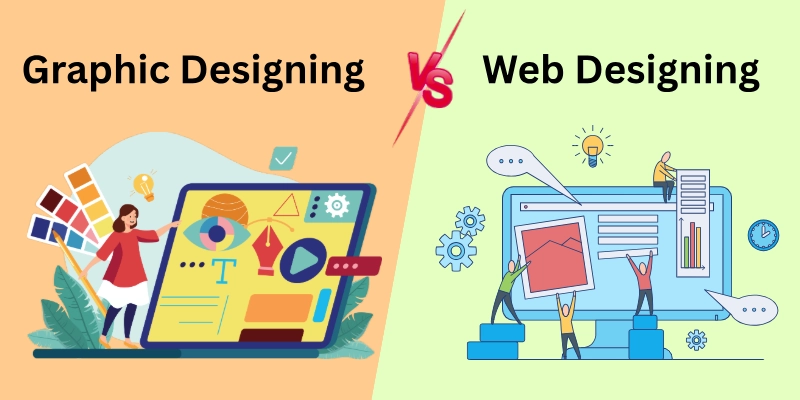
Difference Between Graphic Designing and Web Designing
Many people are exploring graphic design and web design as career options. Both deal with visuals, but they are not the same. See how each one stands out and which might fit you best!
- Purpose
- Use of Designs
- Core Focus
- Skills Required
- Tools
- Output Format
- Technical Knowledge
- User Interaction
- Design Constraints
- Projects
Wondering what really makes these two skills different? Let’s break it down step by step.
1. Purpose
Graphic Designing → Focuses on visual communication. It presents ideas and messages through images, typography, and layout. It helps brands express emotions, identity, and meaning through visuals. Designers carefully choose colours, shapes, and fonts to influence how viewers feel and understand the message.
Web Designing → It’s based on how a website looks and functions. It ensures users can navigate and interact easily. It organizes content so visitors quickly find what they need without confusion. A well-structured layout improves user satisfaction and keeps people on the site longer.
- Graphic design attracts attention and strengthens brand identity.
- Web design improves user experience and helps visitors find information quickly.
- Clear visuals increase understanding and trust.
- Easy navigation keeps users engaged longer.
2. Use of Designs
Graphic Designing → Used in print and digital media such as brochures, ads, packaging, and social posts. Graphic designing is also work from home. Businesses use graphic materials to promote products and create a consistent visual identity across platforms. These designs attract attention and influence customer decisions.
Web Designing → Used on websites, web apps, and mobile interfaces. It ensures content displays properly on different devices and screen sizes. Designers structure pages to maintain clarity whether viewed on a phone, tablet, or desktop.
- Businesses use graphic design for marketing and promotion.
- Websites rely on web design to present services and information.
- Mobile-friendly layouts improve accessibility for users.
- Strong visuals help brands stay memorable.
3. Core Focus
Graphic Designing → Emphasizes aesthetics, branding, and visual appeal. It creates strong first impressions through colour harmony, layout balance, and striking visuals. Designers ensure every element supports brand recognition and visual consistency.
Web Designing → Highlights usability, structure, and user interaction, also covering graphics in web design and the visual design of websites. It prioritizes clarity so users can complete tasks quickly and smoothly. Logical structure improves navigation and reduces confusion.
- Graphic design builds emotional connection through visuals.
- Web design ensures visitors can use the site without confusion.
- Balanced layouts improve readability and clarity.
- Consistent design strengthens brand recognition.
4. Skills Required
Graphic Designing → Creativity, typography, color theory, composition, and visual storytelling are required. Designers must understand visual hierarchy to guide viewers’ attention effectively. A strong imagination helps transform ideas into appealing visuals.
Web Designing → Layout planning, user experience (UX), user interface (UI), and basic coding understanding are important skills for web designing. Designers study user behaviour to create smooth navigation and clear interactions. Technical awareness helps them collaborate better with developers.
- Strong colour choices improve visual harmony.
- UX skills help designers understand user behaviour.
- Problem-solving improves layout effectiveness.
- Continuous practice strengthens design quality.
5. Tools
Graphic Designing → Adobe Photoshop and Illustrator for image editing and vector design. These tools allow designers to create detailed artwork, enhance images, and prepare files for print or digital use. Mastery of tools improves efficiency and precision.
Web Designing → Figma and Adobe XD for interface layout and user experience design. These tools help designers build wireframes, prototypes, and responsive layouts before development begins. They also support team collaboration and feedback.
- Designers use layers and effects to enhance visuals.
- Prototyping tools help preview website layouts.
- Collaboration tools allow teams to work together smoothly.
- Proper tool use speeds up the workflow.
6. Output Format
Graphic Designing → Produces static files such as JPG, PNG, PDF, or print-ready formats. These files maintain fixed dimensions and appear the same across different platforms. Designers optimize resolution and size to ensure clarity and quality.
Web Designing → Builds interactive layouts that function within a live website, often part of graphic design for the web. Layouts adjust dynamically based on screen size and user behaviour. Designers test responsiveness to maintain usability.
- Print designs maintain fixed dimensions.
- Websites adjust layout across devices.
- Interactive elements improve user engagement.
- Optimized files improve loading speed.
7. Technical Knowledge
Graphic Designing → Does not require coding knowledge. Designers focus on visual tools and creative techniques to deliver appealing graphics. However, understanding file formats and resolution improves professional results.
Web Designing → Basic knowledge of HTML and CSS is helpful for implementation. It allows designers to understand layout structure and communicate effectively with developers. Technical familiarity helps avoid design issues during development.
- Understanding file formats improves output quality.
- Basic coding helps designers communicate with developers.
- Structured layouts improve website performance.
- Technical awareness reduces design errors.
8. User Interaction
Graphic Designing → Viewers observe the design but do not interact with it. The goal is to capture attention and communicate the message instantly. Strong visuals encourage viewers to remember the brand.
Web Designing → Users interact with menus, buttons, and navigation elements. Interactive features guide users toward actions such as signing up or making purchases. Smooth interaction enhances the user experience and increases engagement.
- Interactive buttons guide users to actions.
- Clear navigation improves usability.
- Visual hierarchy helps users scan information quickly.
- Engaging layouts increase user retention.
9. Design Constraints
Graphic Designing → Offers creative freedom with fewer technical limitations. Designers can experiment with layouts, colours, and styles without device restrictions. Print dimensions remain fixed once finalized.
Web Designing → Some beginners find web design hard at first. Screen sizes, responsiveness, loading speed, and accessibility are easy to start with. Designers must ensure layouts adapt across devices and maintain fast performance.
- Responsive design ensures content fits all screens.
- Accessibility improves usability for all users.
- Fast loading increases user satisfaction.
- Structured layouts improve readability.
10. Projects
Graphic Designing → Builds brand identity and visual marketing materials. It strengthens recognition through logos, promotional graphics, and consistent visual themes. Strong branding improves customer trust and recall.
Web Designing → Creates functional digital experiences that guide user actions and supports web design as a career. It helps businesses convert visitors into customers through structured user journeys. Effective design improves engagement and retention.
- Strong branding builds customer trust.
- Functional websites increase conversions.
- Consistent design improves professionalism.
- Good design enhances customer experience.
These differences show that both fields use creativity, but they serve different roles in the digital world. Now this question comes to everyone’s mind.
Which One Should You Choose?
Choosing between graphic designing and web designing depends on your goals, interests, and the type of work you enjoy.
- For Beginners: Graphic designing is easier to start with. You can practice at home, create logos, posters, or social media graphics, and build your skills quickly. Web designing can feel tricky at first because it involves layouts, coding basics, and interactive design.
- For Experts: Web designing is ideal if you want to handle complex websites, work with development teams, or create interactive user experiences. Graphic designers with advanced skills can also work on big branding projects and high-end visual campaigns.
- For Small Businesses or Freelancers: Graphic designing works well if you need marketing visuals, logos, or social media content. Web designing is better if you want to build a professional website or improve user experience online.
- For Professionals and Teams: Web designing fits teams building websites, apps, or digital platforms. Graphic designing supports marketing departments, advertising agencies, or design studios focusing on visuals.
Both fields are creative and in demand. The key is to choose the one that matches your interests and career goals. Focus on what excites you most, and see the end.
Conclusion
This blog reveals the secret of graphic design vs web design. Graphic designing focuses on visual communication, while web design focuses on making websites look good and work well. They use different skills, tools, and methods, and the results serve different purposes.
If you want graphic designing work from home, choose visuals. If you enjoy building websites, go for web design. Pick the one that fits your interest and start creating!
FAQS
Curious to know more? Let’s answer the most common questions about the comparison between graphic designing and web designing in this section.
No, they are not the same. Graphic design focuses on creating visuals like logos, posters, and social media graphics. Graphic communication is broader and includes all ways visuals convey a message, including charts, signs, and infographics.
The primary purpose of graphic design is to communicate ideas visually. It helps brands and businesses share messages clearly using images, colours, and text. Graphic design makes information easy to understand and visually appealing.
A web designer is someone who plans and creates how a website looks and works. They focus on layout, colours, navigation, and user experience. Web designers make websites easy to use and attractive for visitors.
Yes, many people start graphic designing at home as freelancers. You can create logos, banners, and social media posts using a computer and design software. It is flexible and helps you earn while improving your skills.
The best computer for graphic design should be fast and have a high-quality display for accurate colours. Both Windows and Mac computers work well for design task if they can run tools like Adobe Photoshop and Illustrator smoothly. A reliable computer helps you create visuals efficiently without lag or delays.
The best web design laptop is one that handles design software like Figma or Adobe XD and allows smooth multitasking. Look for a device with a good processor, plenty of RAM, and a high-resolution display. A powerful laptop makes designing websites easier and faster.
Yes, combining both skills is very useful. You can create graphic design for the web, including images, banners, and icons that fit websites. Learning both helps you manage visuals and layout together, making your work more professional and universal.

- Be Respectful
- Stay Relevant
- Stay Positive
- True Feedback
- Encourage Discussion
- Avoid Spamming
- No Fake News
- Don't Copy-Paste
- No Personal Attacks
- Be Respectful
- Stay Relevant
- Stay Positive
- True Feedback
- Encourage Discussion
- Avoid Spamming
- No Fake News
- Don't Copy-Paste
- No Personal Attacks
