Graphic Designing Skills You are Missing Out On
Published: 19 Feb 2026
Many beginners feel lost and frustrated when they try to learn graphic designing skills. They worry about skills, software, and where to start. I felt the same when I practiced with Photoshop and Canva for client work. With time, mastering graphic design skills happens in small steps.
Beginners often think design is a matter of talent, but I have learned it is a mix of practice, simple tools, and clear thinking. I will clear the confusion that stops beginners from taking action. Knowledge of simple skills helps reduce stress for learners.
Best Skills for Graphic Designing
When you learn the skills of graphic designing, visuals stop feeling random. Everything you create starts to make sense. Curious how designers do it? The answer sits in the skills you are about to see. There are two main skills in graphic designing :
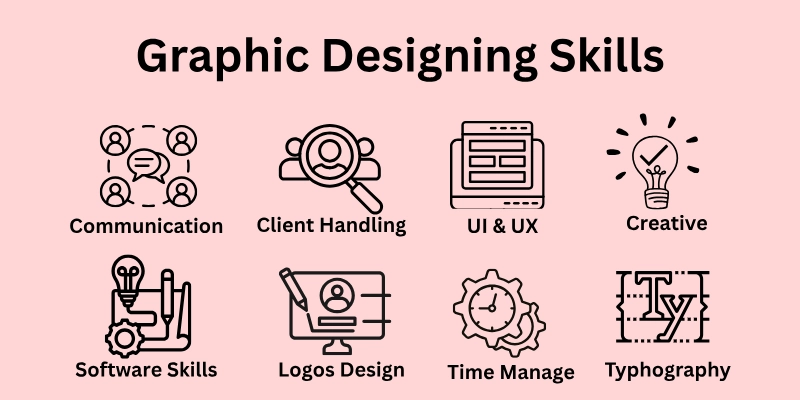
- Hard Skills
- Soft Skills
These are the best skills needed for graphic design. Every great design starts with mastering the skills behind it. Here is what you need to know.
Hard Skills
These are tool-based and design-based skills that beginners practice to make visuals. Now we will see in detail how hard skills for graphic designers are helpful.
- Colour Theory
- Typography
- Layout and Composition
- Visual Hierarchy
- Branding Basics
- Logo Design
- Photo Editing
- Digital Illustration
- UI and UX Basics
- Grid Systems
- Print Design Basics
- Motion Graphics
- Image Manipulation
- Icon Design
- Infographic Design
- Responsive Design
- Concept Development
- Software Skills
Let’s start.
1. Colour Theory
Colour theory is the study of how colours work together in designs to create the right mood, balance, and impact. Understanding this helps designers make visuals that look appealing and communicate messages clearly.
Features:
- Learn primary, secondary, and complementary colours.
- Understand its moods and emotions.
- Master colour combinations that attract attention
- Improve readability and contrast in designs
- Apply colours consistently for branding
Best Choice for: Anyone who wants their designs to stand out visually should learn colour theory. It is perfect for beginners who want to create logos, social media posts, or branding materials.
2. Typography
Typography is the art of arranging text in a way that makes it readable and visually appealing. It includes choosing fonts, sizes, spacing, and alignment to match the design’s purpose.
Features:
- Select fonts that fit the brand or message
- Control line spacing and letter spacing for clarity
- Combine multiple fonts effectively
- Ensure readability across devices and print
- Enhance visual hierarchy in text-heavy designs
Best Choice for: The person working on designs with text, like posters, social media posts, or websites, should focus on typography. It is ideal for beginners who want to communicate messages clearly.
3. Layout and Composition
Layout and composition are about organizing design elements on a page or screen to make the design balanced and attractive. A good layout guides the viewer’s eye and emphasizes important content.
Features:
- Create balanced and harmonious designs
- Use grids to align elements properly
- Highlight important content using spacing and placement
- Guide viewers’ attention naturally
- Combine images, text, and graphics effectively
Best Choice for: Beginners designing websites, posters, or social media graphics should learn layout and composition. It’s great for anyone who wants their designs to look professional and well-organized.
4. Visual Hierarchy
Visual hierarchy is the technique of arranging design elements so viewers notice the most important parts first. It makes designs easier to understand and more engaging.
Features:
- Emphasize headings, subheadings, and key points
- Use size, colour, and placement to guide attention
- Organize information logically
- Improve readability and user experience
- Make designs visually appealing and structured
Best Choice for: Creating websites, infographics, or presentations gives the benefit of visual hierarchy for designers. Beginners who want their designs to communicate ideas clearly should start here.
5. Branding Basics
Branding basics teach how to create consistent designs that represent a business or product. This skill ensures visuals match a brand’s identity and values.
Features:
- Maintain consistent fonts and style
- Create logos, icons, and brand elements
- Design marketing materials that reflect the brand
- Understand the brand’s personality and audience
- Build a professional and recognizable visual identity
Best Choice for: One should learn branding basics if they want to work with businesses, startups, or personal brands. It is perfect for those who want to help brands look professional and trustworthy.
6. Logo Design
Logo design is the art of creating a unique symbol or mark that represents a brand, product, or company. A good logo is memorable, simple, and conveys the brand’s personality.
Features:
- Create simple, recognizable logos
- Work with shapes, colours, and typography
- Ensure scalability for print and digital use
- Make designs suitable for multiple platforms
- Communicate brand identity effectively
Best Choice for: It is best for those who work with brands or freelance in visual identity to learn logo design. And ideal for anyone who wants to create memorable and professional brand symbols.
7. Photo Editing
Photo editing is the process of enhancing images to improve their quality or change their appearance. Designers use photo editing to make visuals more appealing, clear, and professional.
Features:
- Adjust brightness, contrast, and saturation
- Remove unwanted elements or backgrounds
- Retouch photos for clarity and style
- Combine multiple images into one composition
- Optimize images for web and print
Best Choice for: Social media posts, marketing content, or website photography comes in photo editing. It is perfect for anyone to make images look polished and professional.
8. Digital Illustration
Digital illustration is creating artwork using digital tools instead of traditional media. It allows designers to make graphics, characters, and visuals for multiple platforms.
Features:
- Create unique illustrations and graphics
- Use digital brushes, shapes, and layers
- Work in vector or raster formats
- Combine illustrations with other design elements
- Customize colors and effects easily
Best Choice for: Beginners interested in creating custom visuals, social media graphics, or character designs should learn digital illustration. It is perfect for designers for more creative freedom.
9. UI and UX Basics
UI (User Interface) and UX (User Experience) basics teach designers how to make websites and apps user-friendly. It ensures designs are easy to use, intuitive, and visually appealing.
Features:
- Create clear navigation and menus
- Design buttons, icons, and forms
- Improve user flow and experience
- Use layout and hierarchy to guide users
- Test designs for usability and engagement
Best Choice for: Beginners interested in web or app design should learn UI and UX basics. It is good for those who want to design for users, not just visuals.
10. Grid Systems
Grid systems are frameworks used to arrange content in a structured way. They help designers maintain alignment, balance, and consistency in layouts.
Features:
- Align text, images, and graphics easily
- Maintain visual balance across pages
- Create responsive designs for multiple devices
- Make complex layouts simple and clean
- Speed up design workflow
Best Choice for: For creating websites, magazines, or social media posts should learn grid systems. It is best who want professional and organized layouts.
11. Print Design Basics
Print design basics focus on creating visuals for physical products like flyers, brochures, and posters. It ensures designs are clear, high-quality, and ready for printing.
Features:
- Understand bleed, margins, and resolution
- Work with the CMYK colour mode for printing
- Design layouts for various print sizes
- Ensure text and images are clear and readable
- Prepare files for professional printing
Best Choice for: Those who want to work in advertising, marketing, or physical products should learn print design. It is also good enough for anyone to create posters, flyers, or brochures.
12. Motion Graphics
Motion graphics basics teach how to animate graphics, text, and images. It helps designers create engaging visuals for videos, presentations, and social media.
Features:
- Animate text and shapes
- Create simple transitions and effects
- Combine illustrations and videos
- Make social media content more dynamic
- Use motion to highlight key messages
Best Choice for: Beginners creating video content, ads, or animated social posts should learn motion graphics basics. It is a good choice for designers who want their visuals to move and capture attention.
13. Image Manipulation
Image manipulation is the process of changing or enhancing photos to create a new or improved visual. Designers use it to create realistic or imaginative results.
Features:
- Merge multiple images seamlessly
- Adjust colours, lighting, and shadows
- Remove or add objects creatively
- Apply special effects to enhance visuals
- Correct imperfections in photos
Best Choice for: Those who are interested in working in advertising, social media, or creative projects should learn image manipulation and can produce eye-catching visuals.
14. Icon Design
Icon design is creating small, simple graphics that represent actions, ideas, or objects. Icons help users understand information quickly in apps, websites, and interfaces.
Features:
- Make simple and clear icons
- Maintain consistency across a set
- Work with vector graphics for easy scaling
- Match icons to brand style
- Enhance navigation and UI clarity
Best Choice for: Those designing apps, websites, or interfaces should learn icon design. It’s perfect for anyone who wants to make designs user-friendly and professional.
15. Infographic Design
Infographic design combines data, visuals, and text to explain ideas quickly. It makes complex information easier to understand and visually appealing.
Features:
- Turn data into easy-to-read graphics
- Use charts, graphs, and icons effectively
- Maintain visual hierarchy for clarity
- Apply colours and fonts for emphasis
- Share information quickly and effectively
Best Choice for: Those who think about making reports, social media posts, or presentations should learn infographic design. And it is to make data simple and attractive.
16. Responsive Design
Responsive design awareness teaches how to make visuals work on different screen sizes. It ensures websites and content look good on phones, tablets, and desktops.
Features:
- Adapt layouts for multiple devices
- Keep text readable on all screens
- Adjust images and graphics for different sizes
- Maintain consistency across devices
- Improve user experience
Best Choice for: For designing websites or digital content, you should learn responsive design. It is good for their visuals to look great everywhere.
17. Concept Development
Concept development is creating ideas and planning visuals before designing. It helps designers think creatively and organize projects efficiently.
Features:
- Brainstorm ideas for projects
- Sketch rough designs before execution
- Plan colour, layout, and style in advance
- Solve design problems early
- Align ideas with client goals
Best Choice for: Those who want structured designs and faster workflows should focus on concept development. It is perfect for those planning branding, campaigns, or digital projects.
18. Software Skills
Software skills are the ability to use tools like Photoshop, Illustrator, Figma, and Canva to create professional designs. Mastery of these tools allows designers to bring ideas to life efficiently.
Features:
- Edit images, illustrations, and layouts
- Create logos, social posts, and graphics
- Work with layers, masks, and effects
- Export designs for web, print, or social media
- Improve speed and accuracy in design work
Best Choice for: Overthinkers can turn ideas into professional visuals after learning software skills. It provides opportunities for anyone aiming to work in freelancing, content creation, or digital design careers.
Soft Skills
These skills help designers work with clients, communicate ideas, and manage time. Now we will take a closer look at why soft skills for graphic designers are also important.
- Creative Thinking
- Problem-Solving
- Communication Skills
- Client Handling
- Feedback Acceptance
- Time Management
Let’s move on to the details of the skills required for a graphic designer.
1. Creative Thinking
Creative thinking is the ability to come up with new ideas and unique solutions for design challenges. It helps designers make visually appealing and original work that stands out.
Features:
- Generate unique concepts for designs
- Combine colours, shapes, and text innovatively
- Adapt ideas to fit different projects
- Solve visual problems creatively
- Think outside traditional layouts
Best Choice for: Beginners and freelancers who want to produce original and eye-catching visuals should learn creative thinking. Best for anyone aiming to make their designs memorable and unique.
2. Problem-Solving
Problem-solving is the ability to find solutions when design challenges appear. It ensures projects stay on track, and visuals communicate clearly.
Features:
- Identify design challenges quickly
- Create practical solutions for visual problems
- Adjust designs to meet client feedback
- Balance creativity with functionality
- Ensure clarity even in black-and-white projects
Best Choice for: Anyone managing projects, clients, or tight deadlines should focus on problem-solving. This is ideal for beginners who want to deliver effective results efficiently.
3. Communication Skills
Communication skills help designers explain ideas clearly to clients, teams, or collaborators. Strong communication ensures that the vision matches the outcome.
Features:
- Explain design choices to clients
- Present concepts effectively
- Listen to feedback and understand requirements
- Collaborate with other designers or teams
- Use visuals to support verbal explanations
Best Choice for: Beginners or freelancers who want their designs to impress clients and match expectations will benefit greatly.
4. Client Handling
Client handling is the skill of managing relationships with clients professionally. It ensures smooth projects, happy clients, and repeat work, whether working on colourful or black and white graphic design.
Features:
- Understand client needs clearly
- Set expectations and timelines
- Maintain professional and polite interactions
- Handle revisions calmly and efficiently
- Build trust for long-term collaboration
Best Choice for: Anyone providing freelance design services or working in agencies should learn client handling. Beginners who want satisfied clients and steady projects will find it invaluable.
5. Feedback Acceptance
Feedback acceptance is the ability to take feedback positively and improve designs. Designers use this skill to refine their work and maintain high quality.
Features:
- Listen to constructive criticism without taking it personally
- Apply suggestions to improve visuals
- Learn and grow from repeated feedback
- Balance personal style with client needs
- Enhance designs for both digital and print
Best Choice for: Freelance designers should focus on feedback acceptance. Anyone wanting to improve skills and maintain good client relationships will benefit from this skill.
6. Time Management
Time management is the skill of planning and completing tasks efficiently. It ensures designers meet deadlines and deliver quality work.
Features:
- Plan daily, weekly, or project-based schedules
- Prioritize tasks by importance and urgency
- Avoid delays and stay focused
- Give time for revisions and client reviews
- Meet deadlines without sacrificing quality
Best Choice for: Experts who handle multiple projects should master time management. And whoever wants consistent results and professional reliability will benefit from this skill.
Now that you know the essential graphic designer skills, it’s time to put them into action and start creating designs that truly impress. But before taking action, see the importance of graphic designing skills.
Why Graphic Skills are Important?
Graphic skills are important because they help you create visuals that communicate ideas clearly and attract attention. They improve your creativity, make your work look professional, and open opportunities for freelancing, digital content, and brand building.
They also give you confidence to present your ideas and get better results. Learning them is an investment that makes your designs stronger and expands your career opportunities.
But before you start designing, you need the right software to put your skills into action, which we will see in the next heading.
Important Software for Graphics
Graphic software is the backbone of every designer’s work. These tools help you turn ideas into professional visuals quickly and accurately. The right software makes the process easier and more efficient.
- Adobe Photoshop: Best for photo editing, retouching, and creating digital graphics.
- Adobe Illustrator: Ideal for vector designs, logos, and illustrations for scalable designs.
- Figma: Great for UI/UX design, web layouts, and collaboration with teams.
- Canva: Perfect for beginners to create social media posts, presentations, and simple graphics quickly.
- CorelDRAW: Useful for print design, vector illustrations, and branding projects.
- After Effects: Helps create motion graphics and animated visuals.
The above software gives you confidence to handle both client projects and personal work. With the right software and skills in hand, your design journey is ready to take off.
Conclusion
This article highlighted the most important graphic designing skills that help you create impactful and professional designs. I know every beginner faces challenges, but by planning carefully, learning consistently, and accepting feedback, you can grow confidently.
In my experience, the more you work on these skills, the better your designs and opportunities will become. Your career goals will shine. In the end, it’s up to you to take action. The important FAQs mostly disturb beginners’ minds; see the end.
FAQs
Here are the answers to confusing FAQs about graphic designing skills.
Beginners should focus on core designing skills like colour theory, typography, layout, and software tools such as Photoshop or Illustrator. These skills help you create professional visuals and communicate ideas clearly. Practicing regularly improves creativity and prepares you for real-world projects.
A graphic designer’s income depends on experience, skill level, and the type of work they do. With strong skills, freelancers or full-time designers can earn a competitive salary. Entry-level designers may start modestly, but earnings grow as skills and portfolios improve.
Yes, graphic designing can be a rewarding career for creative and detail-oriented individuals. Developing graphics opens opportunities in freelancing, agencies, or corporate work. It offers flexibility, growth potential, and the chance to work on diverse projects.
A graphic designer uses skills to create visuals that communicate ideas effectively. They plan layouts, select colours, design logos, and ensure the visual message matches the project goals. Their work improves branding, marketing, and overall user engagement.
Here are important steps:
- Start by practicing regularly and experimenting with different tools and techniques.
- Follow tutorials, study design trends, and analyze professional work to learn what works.
- Over time, applying these skills to small real-world projects helps you gain confidence and experience.




- Be Respectful
- Stay Relevant
- Stay Positive
- True Feedback
- Encourage Discussion
- Avoid Spamming
- No Fake News
- Don't Copy-Paste
- No Personal Attacks
- Be Respectful
- Stay Relevant
- Stay Positive
- True Feedback
- Encourage Discussion
- Avoid Spamming
- No Fake News
- Don't Copy-Paste
- No Personal Attacks
